Installation and updating
Installation
Download and install Blender 3.3 (the current LTS version).
Download the “latest” or “pre-release” version (zip file) from the project page on GitHub: https://github.com/Nusiq/mcblend/releases
Note
Mcblend project uses pre-release for versions which aren’t fully documented. The are stable and ready to use. It’s recommended to use the pre-release version because it may contain some bug fixes and in most cases the only downside is that you might see some unexplained buttons here and there.
Sometimes there is no pre-release version available. This means that the project is fully documented and you should download the latest version.
In Blender go to:
Edit -> Preferences -> Add-ons -> Install...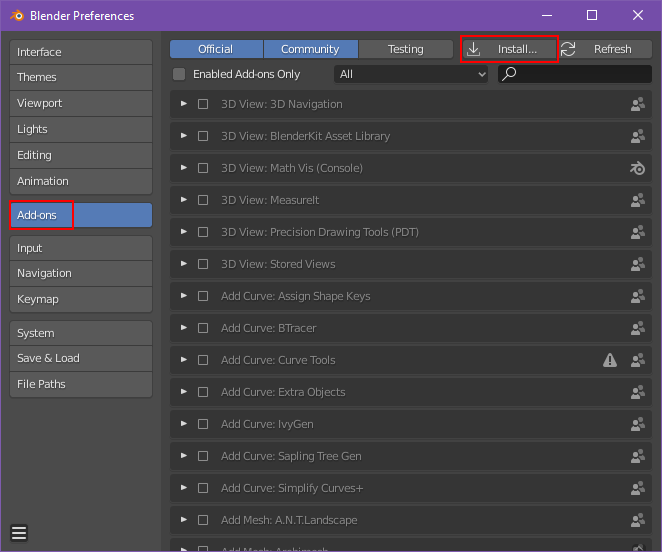
Select the zip file in the file explorer.

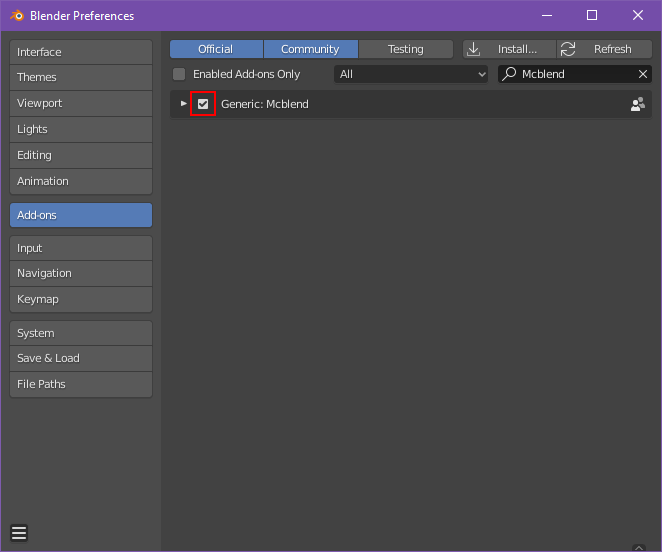
Search for “Mcblend” in Add-ons and select the checkbox to enable the add-on
Updating
Currently there is no system for updating Mcblend. If you want to update it, you must uninstall the old version of the addon and then install the new one.