Attachables & First person animations (Detailed Tutorial)
Mcblend version: 9.2.2
Blender version: 2.93.1
Minecraft version: 1.17.32
This is a text based version of a tutorial that shows in detail how to create an attachable item in Minecraft Bedrock Edition and how to create an 1st person animation for it.
This tutorial assumes that you know how to create empty behavior and resource- pack so creating manifest files is not explained here. If you don’t know how to do it I recommend tutorials from Bedrock Wiki or Official Minecraft Documentation:
In the tutorial BP refers to the root folder of behavior-pack and RP refers
to the root folder of the resource-pack.
The tutorial is not limited to just showing the features of Mcblend. It also explains how to connect created resources to the behavior- and resource-pack.
All of the resources related to the video are available here.
The video version of the tutorial
Basic setup
Start with empty project and add folowing files to create custom item and attachable.
RP/textures/items/nunchaku.png

RP/textures/entity/nunchaku.png

[CLICK TO REVEAL] BP/items/nunchaku.bp_item.json
{
	"format_version": "1.10",
	"minecraft:item": {
		"description": {
			"identifier": "nusiq:nunchaku"
		},
		"components": {
			"minecraft:use_duration": 2000000000,
			"minecraft:max_stack_size": 1,
			"minecraft:food": {
				"can_always_eat": true,
				"nutrition": 0
			}
		}
	}
}
[CLICK TO REVEAL] RP/items/nunchaku.rp_item.json
{
	"format_version": "1.10.0",
	"minecraft:item": {
		"description": {
			"identifier": "nusiq:nunchaku"
		},
		"components": {
			"minecraft:icon": "nunchaku"
		}
	}
}
[CLICK TO REVEAL] RP/textures/item_texture.json
{
	"resource_pack_name": "vanilla",
	"texture_name": "atlas.items",
	"texture_data": {
		"nunchaku": {
			"textures": "textures/items/nunchaku"
		}
	}
}
[CLICK TO REVEAL] RP/attachables/nunchaku.attachable.json
{
	"format_version": "1.10.0",
	"minecraft:attachable": {
		"description": {
			"identifier": "nusiq:nunchaku",
			"materials": {
				"default": "entity_alphatest"
			},
			"textures": {
				"default": "textures/entity/nunchaku"
			},
			"geometry": {
				"default": "geometry.nunchaku"
			},
			"render_controllers": [
				"controller.render.default"
			]
		}
	}
}
[CLICK TO REVEAL] RP/models/entity/nunchaku.geo.json
{
	"format_version": "1.16.0",
	"minecraft:geometry": [
		{
			"description": {
				"identifier": "geometry.nunchaku",
				"texture_width": 58,
				"texture_height": 28,
				"visible_bounds_width": 2,
				"visible_bounds_height": 1.5,
				"visible_bounds_offset": [0, 0.25, 0]
			},
			"bones": [
				{
					"name": "end1",
					"pivot": [-0.025, 1, 1],
					"rotation": [0, -180, 0],
					"cubes": [
						{
							"origin": [-1.775, -0.75, 4.5],
							"size": [3.5, 3.5, 3],
							"inflate": -1,
							"pivot": [-0.025, 1, 6.5],
							"rotation": [0, 0, 180],
							"uv": {
								"north": {"uv": [4.143, 4], "uv_size": [5.179, 5]},
								"east": {"uv": [0, 4], "uv_size": [4.143, 5]},
								"south": {"uv": [13.464, 4], "uv_size": [5.179, 5]},
								"west": {"uv": [9.321, 4], "uv_size": [4.143, 5]},
								"up": {"uv": [4.143, 0], "uv_size": [5.179, 4]},
								"down": {"uv": [9.321, 4], "uv_size": [5.179, -4]}
							}
						},
						{
							"origin": [-2.025, -1, -5],
							"size": [4, 4, 12],
							"inflate": -1,
							"pivot": [-0.025, 1, 1],
							"rotation": [0, 180, 0],
							"uv": {
								"north": {"uv": [22.786, 22], "uv_size": [6.214, 6]},
								"east": {"uv": [0, 22], "uv_size": [22.786, 6]},
								"south": {"uv": [51.786, 22], "uv_size": [6.214, 6]},
								"west": {"uv": [29, 22], "uv_size": [22.786, 6]},
								"up": {"uv": [22.786, 0], "uv_size": [6.214, 22]},
								"down": {"uv": [29, 22], "uv_size": [6.214, -22]}
							}
						}
					]
				},
				{
					"name": "mid",
					"parent": "end1",
					"pivot": [-0.025, 1, 6.5],
					"cubes": [
						{
							"origin": [-1.075, -0.84, 7.83],
							"size": [2.1, 3.68, 4.24],
							"inflate": -1,
							"pivot": [-0.025, 1, 9.95],
							"rotation": [0, 180, -90],
							"uv": {
								"north": {"uv": [0, -2], "uv_size": [0, 0]},
								"east": {"uv": [47.643, 0], "uv_size": [10.357, 8]},
								"south": {"uv": [1, -2], "uv_size": [0, 0]},
								"west": {"uv": [47.643, 11], "uv_size": [10.357, 8]},
								"up": {"uv": [0, -2], "uv_size": [0, 0]},
								"down": {"uv": [0, -2], "uv_size": [0, 0]}
							}
						},
						{
							"origin": [-1.05, -0.84, 9.63],
							"size": [2.05, 3.68, 4.24],
							"inflate": -1,
							"pivot": [-0.025, 1, 11.75],
							"rotation": [0, 180, 0],
							"uv": {
								"north": {"uv": [0, -2], "uv_size": [0, 0]},
								"east": {"uv": [47.643, 0], "uv_size": [10.357, 8]},
								"south": {"uv": [1, -2], "uv_size": [0, 0]},
								"west": {"uv": [47.643, 11], "uv_size": [10.357, 8]},
								"up": {"uv": [0, -2], "uv_size": [0, 0]},
								"down": {"uv": [0, -2], "uv_size": [0, 0]}
							}
						},
						{
							"origin": [-1.075, -0.84, 11.43],
							"size": [2.1, 3.68, 4.24],
							"inflate": -1,
							"pivot": [-0.025, 1, 13.55],
							"rotation": [0, 180, -90],
							"uv": {
								"north": {"uv": [0, -2], "uv_size": [0, 0]},
								"east": {"uv": [47.643, 0], "uv_size": [10.357, 8]},
								"south": {"uv": [1, -2], "uv_size": [0, 0]},
								"west": {"uv": [47.643, 11], "uv_size": [10.357, 8]},
								"up": {"uv": [0, -2], "uv_size": [0, 0]},
								"down": {"uv": [0, -2], "uv_size": [0, 0]}
							}
						},
						{
							"origin": [-1.075, -0.84, 6.03],
							"size": [2.1, 3.68, 4.24],
							"inflate": -1,
							"pivot": [-0.025, 1, 8.15],
							"rotation": [0, 180, 0],
							"uv": {
								"north": {"uv": [0, -2], "uv_size": [0, 0]},
								"east": {"uv": [47.643, 0], "uv_size": [10.357, 8]},
								"south": {"uv": [1, -2], "uv_size": [0, 0]},
								"west": {"uv": [47.643, 11], "uv_size": [10.357, 8]},
								"up": {"uv": [0, -2], "uv_size": [0, 0]},
								"down": {"uv": [0, -2], "uv_size": [0, 0]}
							}
						}
					]
				},
				{
					"name": "end2",
					"parent": "mid",
					"pivot": [-0.025, 1, 15.211],
					"cubes": [
						{
							"origin": [-2.025, -1, 14.711],
							"size": [4, 4, 12],
							"inflate": -1,
							"pivot": [-0.025, 1, 20.711],
							"rotation": [0, 0, 180],
							"uv": {
								"north": {"uv": [22.786, 22], "uv_size": [6.214, 6]},
								"east": {"uv": [0, 22], "uv_size": [22.786, 6]},
								"south": {"uv": [51.786, 22], "uv_size": [6.214, 6]},
								"west": {"uv": [29, 22], "uv_size": [22.786, 6]},
								"up": {"uv": [22.786, 0], "uv_size": [6.214, 22]},
								"down": {"uv": [29, 22], "uv_size": [6.214, -22]}
							}
						},
						{
							"origin": [-1.775, -0.75, 13.211],
							"size": [3.5, 3.5, 3],
							"inflate": -1,
							"pivot": [-0.025, 1, 15.211],
							"rotation": [0, 180, 0],
							"uv": {
								"north": {"uv": [4.143, 4], "uv_size": [5.179, 5]},
								"east": {"uv": [0, 4], "uv_size": [4.143, 5]},
								"south": {"uv": [13.464, 4], "uv_size": [5.179, 5]},
								"west": {"uv": [9.321, 4], "uv_size": [4.143, 5]},
								"up": {"uv": [4.143, 0], "uv_size": [5.179, 4]},
								"down": {"uv": [9.321, 4], "uv_size": [5.179, -4]}
							}
						}
					]
				}
			]
		}
	]
}
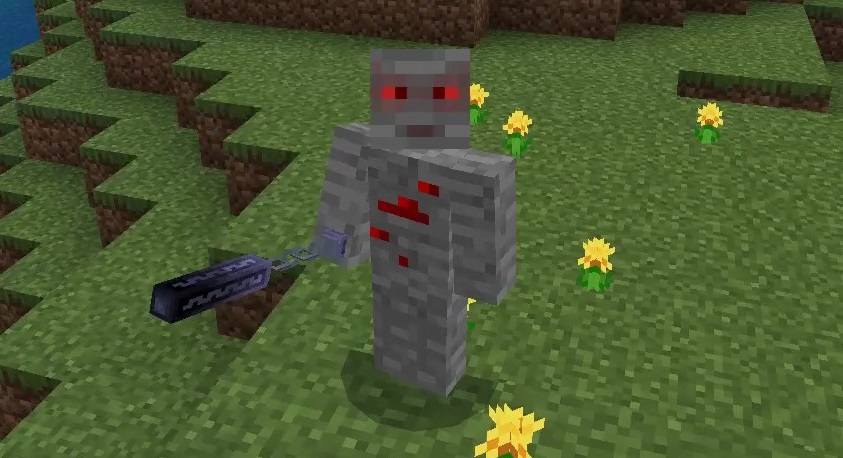
At this stage you while holding the custom item the model of the item should be visible in 3rd person view, but its not connected to any of the bones of the player model.

Connecting the item model to player’s hand
Download the template project for player animations: https://github.com/Nusiq/Mcblend-Demo-World/blob/master/BLENDER/template-project.blend
Import the model of the attachable and optionally
import the texture. In order to import texture you need to open it in Blender
first (just like you open any other image), and than you can select the
armature of the attachable, go to Object properties-> Mcblend: Render Controllers.

In this panel you can set up the render controller of the model and apply it by pressing “Apply Materials” button.
With the armature of the attachable selected, go to the pose mode and select
the root bone of your custom item. Go to
Object properties -> Mcblend: Bone Properties. In the Binding text field
put the name of the bone that you want to connect your item to - 'rightitem'
(use only lowercase letters).

Connect the armature of the attachable item to the empty from the template project using “Child Of” constraint and press the “Clear Inverse” button on the constraint. This action will move the item to the position where Minecraft will render the attachable in the game (Minecraft adds [0m, -1.5m, 0m] offset to the attachable items in relation to the bone they’re connected to)

In pose mode adjust the position of the item. When you’re happy with your result, use the “Apply Pose as Rest Pose” operator which you can find in the F3 menu.

Disable the child-of property of the item armature and export it to overwrite the old model.

At this point the model should be properly attached to the player’s hand.
Idle animations
There will be 2 idle animations - one for the player and one for the item. The idle animations are the animations played when the player is holding the item but not doing anything with it. In this example both of the idle animations will contain only a single frame which effectively make them idle poses.
To create player idle animation select the player armature, go to
Object properties -> Mcblend: Animations, create new animation and copy
the configuration from the image below.

Create new action for the armature using action editor in the dope sheet. Every animation in Mcblend must have an additional keyframe at the frame 0 (before the animation starts). The model should be in its rest pose (no transformation) at the frame 0. Mcblend uses frame 0 as a point of reference to calculate the transformations of all of the other frames. The actual pose for the idle animation should be keyframed at the frame 1. While creating the 1st person pose you can enter the 1st person camera included in the template project by pressing 0 on the numpad, to make it easier for yourself.
The image below shows a dope sheet with an action for player idle animation, with two keyframes. In the 3D viewport the scene is observed through the 1st person camera.

When the action is ready, push it down to the NLA editor with the “Push Down”
button. Then switch to the object mode, select the armature of the player
and export the animation File -> Export -> Export Bedrock animation.
The idle animation will be connected to the player through a custom animation controller which will be animated in the default player animation controller in the “first_person” state. Add default player client_entity definition and the definition of root animation controller from default resource pack to your resource pack. And modify these files as shown below.
All of the lines with comments in the examples below will be uncommented later during this tutorial. They’re prepared for the resource which aren’t ready at this stage.
[CLICK TO REVEAL] RP/entity/player.entity.json
{
	"format_version": "1.10.0",
	"minecraft:client_entity": {
		"description": {
			"identifier": "minecraft:player",
			"materials": {
				"default": "entity_alphatest",
				"cape": "entity_alphatest",
				"animated": "player_animated"
			},
			"textures": {
				"default": "textures/entity/steve",
				"cape": "textures/entity/cape_invisible"
			},
			"geometry": {
				"default": "geometry.humanoid.custom",
				"cape": "geometry.cape"
			},
			"scripts": {
				"scale": "0.9375",
				// "variables": {
				// 	"variable.attack_time": "public"
				// },
				"initialize": [
					"variable.is_holding_right = 0.0;",
					"variable.is_blinking = 0.0;",
					"variable.last_blink_time = 0.0;",
					"variable.hand_bob = 0.0;"
				],
				"pre_animation": [
					"variable.helmet_layer_visible = 1.0;",
					"variable.leg_layer_visible = 1.0;",
					"variable.boot_layer_visible = 1.0;",
					"variable.chest_layer_visible = 1.0;",
					"variable.attack_body_rot_y = Math.sin(360*Math.sqrt(variable.attack_time)) * 5.0;",
					"variable.tcos0 = (math.cos(query.modified_distance_moved * 38.17) * query.modified_move_speed / variable.gliding_speed_value) * 57.3;",
					"variable.first_person_rotation_factor = math.sin((1 - variable.attack_time) * 180.0);",
					"variable.hand_bob = query.life_time < 0.01 ? 0.0 : variable.hand_bob + ((query.is_on_ground && query.is_alive ? math.clamp(math.sqrt(math.pow(query.position_delta(0), 2.0) + math.pow(query.position_delta(2), 2.0)), 0.0, 0.1) : 0.0) - variable.hand_bob) * 0.02;",
					"variable.map_angle = math.clamp(1 - variable.player_x_rotation / 45.1, 0.0, 1.0);",
					"variable.item_use_normalized = query.main_hand_item_use_duration / query.main_hand_item_max_duration;"
				],
				"animate": [
					"root"
				]
			},
			"animations": {
				"root": "controller.animation.player.root",
				"base_controller": "controller.animation.player.base",
				// "first_person.nunchaku_attack": "animation.player.first_person.nunchaku_attack",
				"player.custom_item_1st_person": "controller.animation.player.custom_item_1st_person",
				"first_person.nunchaku_idle": "animation.player.first_person.nunchaku_idle",
				"hudplayer": "controller.animation.player.hudplayer",
				"humanoid_base_pose": "animation.humanoid.base_pose",
				"look_at_target": "controller.animation.humanoid.look_at_target",
				"look_at_target_ui": "animation.player.look_at_target.ui",
				"look_at_target_default": "animation.humanoid.look_at_target.default",
				"look_at_target_gliding": "animation.humanoid.look_at_target.gliding",
				"look_at_target_swimming": "animation.humanoid.look_at_target.swimming",
				"look_at_target_inverted": "animation.player.look_at_target.inverted",
				"cape": "animation.player.cape",
				"move.arms": "animation.player.move.arms",
				"move.legs": "animation.player.move.legs",
				"swimming": "animation.player.swim",
				"swimming.legs": "animation.player.swim.legs",
				"riding.arms": "animation.player.riding.arms",
				"riding.legs": "animation.player.riding.legs",
				"holding": "animation.player.holding",
				"brandish_spear": "animation.humanoid.brandish_spear",
				"holding_spyglass": "animation.humanoid.holding_spyglass",
				"charging": "animation.humanoid.charging",
				"attack.positions": "animation.player.attack.positions",
				"attack.rotations": "animation.player.attack.rotations",
				"sneaking": "animation.player.sneaking",
				"bob": "animation.player.bob",
				"damage_nearby_mobs": "animation.humanoid.damage_nearby_mobs",
				"bow_and_arrow": "animation.humanoid.bow_and_arrow",
				"use_item_progress": "animation.humanoid.use_item_progress",
				"skeleton_attack": "animation.skeleton.attack",
				"sleeping": "animation.player.sleeping",
				"first_person_base_pose": "animation.player.first_person.base_pose",
				"first_person_empty_hand": "animation.player.first_person.empty_hand",
				"first_person_swap_item": "animation.player.first_person.swap_item",
				"first_person_attack_controller": "controller.animation.player.first_person_attack",
				"first_person_attack_rotation": "animation.player.first_person.attack_rotation",
				"first_person_vr_attack_rotation": "animation.player.first_person.vr_attack_rotation",
				"first_person_walk": "animation.player.first_person.walk",
				"first_person_map_controller": "controller.animation.player.first_person_map",
				"first_person_map_hold": "animation.player.first_person.map_hold",
				"first_person_map_hold_attack": "animation.player.first_person.map_hold_attack",
				"first_person_map_hold_off_hand": "animation.player.first_person.map_hold_off_hand",
				"first_person_map_hold_main_hand": "animation.player.first_person.map_hold_main_hand",
				"first_person_crossbow_equipped": "animation.player.first_person.crossbow_equipped",
				"third_person_crossbow_equipped": "animation.player.crossbow_equipped",
				"third_person_bow_equipped": "animation.player.bow_equipped",
				"crossbow_hold": "animation.player.crossbow_hold",
				"crossbow_controller": "controller.animation.player.crossbow",
				"shield_block_main_hand": "animation.player.shield_block_main_hand",
				"shield_block_off_hand": "animation.player.shield_block_off_hand",
				"blink": "controller.animation.persona.blink"
			},
			"render_controllers": [
				{
					"controller.render.player.first_person": "variable.is_first_person"
				},
				{
					"controller.render.player.third_person": "!variable.is_first_person && !variable.map_face_icon"
				},
				{
					"controller.render.player.map": "variable.map_face_icon"
				}
			],
			"enable_attachables": true
		}
	}
}
[CLICK TO REVEAL] RP/animation_controllers/player.rp_ac.json
{
	"format_version" : "1.10.0",
	"animation_controllers" : {
		"controller.animation.player.custom_item_1st_person": {
			"states": {
				"default": {
					"transitions": [
						{
							"nunchaku": "query.get_equipped_item_name('main_hand') == 'nunchaku'"
						}
					]
				},
				"nunchaku": {
					"transitions": [
						{
							"default": "query.get_equipped_item_name('main_hand') != 'nunchaku'"
						}
					],
					"animations": [
						{"first_person.nunchaku_idle": "variable.attack_time <= 0.0"},
						{"first_person_breathing_bob": "variable.attack_time <= 0.0"}
						// {"first_person.nunchaku_attack": "variable.attack_time > 0.0"}
					]
				}
			}
		},
		"controller.animation.player.root" : {
			"initial_state" : "first_person",
			"states" : {
				"first_person" : {
					"animations" : [
						"first_person_swap_item",
						{
							"first_person_attack_controller" : "variable.attack_time > 0.0f && query.get_equipped_item_name != 'map'"
						},
						"first_person_base_pose",
						{
							"first_person_empty_hand" : "query.get_equipped_item_name(0, 1) != 'map'"
						},
						{
							"first_person_walk" : "variable.bob_animation"
						},
						{
							"first_person_map_controller" : "(query.get_equipped_item_name(0, 1) == 'map' || query.get_equipped_item_name('off_hand') == 'map')"
						},
						{
							"first_person_crossbow_equipped": "query.get_equipped_item_name == 'crossbow' && (variable.item_use_normalized > 0 && variable.item_use_normalized < 1.0)"
						},
						{
							"first_person_breathing_bob": "variable.attack_time <= 0.0"
						},
						"player.custom_item_1st_person"
					],
					"transitions" : [
						{
							"paperdoll" : "variable.is_paperdoll"
						},
						{
							"map_player" : "variable.map_face_icon"
						},
						{
							"third_person" : "!variable.is_first_person"
						}
					]
				},
				"map_player" : {
					"transitions" : [
						{
							"paperdoll" : "variable.is_paperdoll"
						},
						{
							"first_person" : "variable.is_first_person"
						},
						{
							"third_person" : "!variable.map_face_icon && !variable.is_first_person"
						}
					]
				},
				"paperdoll" : {
					"animations" : [ "humanoid_base_pose", "look_at_target_ui", "move.arms", "move.legs", "cape" ],
					"transitions" : [
						{
							"first_person" : "!variable.is_paperdoll && variable.is_first_person"
						},
						{
							"map_player" : "variable.map_face_icon"
						},
						{
							"third_person" : "!variable.is_paperdoll && !variable.is_first_person"
						}
					]
				},
				"third_person" : {
					"animations" : [
						"humanoid_base_pose",
						{
							"look_at_target" : "!query.is_sleeping && !query.is_emoting"
						},
						"move.arms",
						"move.legs",
						"cape",
						{
							"riding.arms" : "query.is_riding"
						},
						{
							"riding.legs" : "query.is_riding"
						},
						"holding",
						{
							"brandish_spear" : "variable.is_brandishing_spear"
						},
						{
							"holding_spyglass": "variable.is_holding_spyglass"
						},
						{
							"charging" : "query.is_charging"
						},
						{
							"sneaking" : "query.is_sneaking && !query.is_sleeping"
						},
						{
							"bob": "!variable.is_holding_spyglass"
						},
						{
							"damage_nearby_mobs" : "variable.damage_nearby_mobs"
						},
						{
							"swimming" : "variable.swim_amount > 0.0"
						},
						{
							"swimming.legs" : "variable.swim_amount > 0.0"
						},
						{
							"use_item_progress" : "( variable.use_item_interval_progress > 0.0 ) || ( variable.use_item_startup_progress > 0.0 ) && !variable.is_brandishing_spear && !variable.is_holding_spyglass"
						},
						{
							"sleeping" : "query.is_sleeping && query.is_alive"
						},
						{
							"attack.positions" : "variable.attack_time >= 0.0"
						},
						{
							"attack.rotations" : "variable.attack_time >= 0.0"
						},
						{
							"shield_block_main_hand" : "query.blocking && query.get_equipped_item_name('off_hand') != 'shield' && query.get_equipped_item_name == 'shield'"
						},
						{
							"shield_block_off_hand" : "query.blocking && query.get_equipped_item_name('off_hand') == 'shield'"
						},
						{
							"crossbow_controller" : "query.get_equipped_item_name == 'crossbow'"
						},
						{
							"third_person_bow_equipped" : "query.get_equipped_item_name == 'bow' && (variable.item_use_normalized > 0 && variable.item_use_normalized < 1.0)"
						}
					],
					"transitions" : [
						{
							"paperdoll" : "variable.is_paperdoll"
						},
						{
							"first_person" : "variable.is_first_person"
						},
						{
							"map_player" : "variable.map_face_icon"
						}
					]
				}
			}
		}
	}
}
At this stage you should be able to see your first person player idle animation while holding the item.

The steps to create the aniamtion for the attachable are very similar. Select the armature of the attachable, create a new animation (using the configuration below), create new action with the pose for the item and export it just like you did with the animation for the player.

The “World origin object” property, is an information for the animation exporter which tells it where is the origin point (0, 0, 0) used to calculate the transformations for the animation. The name inserted in the example above is the name of the empty which is connected with the item armature via “Child Of” constraint. This setting in this example assures that the transformations of the player model (which affect the position of the item) won’t be exported into the animation of the item. Only the transformations relative to the empty will be affecting the animation.
Once again the animation will be connected to the model via custom aniamtion controller. The lines with comments will be later uncommented during this tutorial but currently they reference the resources that don’t exist yet.
In the attachable definitionvariable.smoothed_adttack_time will be used for
the attack animation. It’s bassically the same as variable.attack_time which
is accessed from the player but it updates more frequently which makes attack
animation smoother. At this point you should make the player’s attack_time
variable public by removing the comment with public variables in player
client_entity definition.
[CLICK TO REVEAL] RP/attachables/nunchaku.attachable.json
{
	"format_version": "1.10.0",
	"minecraft:attachable": {
		"description": {
			"identifier": "nusiq:nunchaku",
			"materials": {
				"default": "entity_alphatest"
			},
			"textures": {
				"default": "textures/entity/nunchaku"
			},
			"animations": {
				"first_person.idle": "animation.nunchaku.first_person.idle",
				// "first_person.attack": "animation.nunchaku.first_person.attack",
				"root": "controller.animation.nunchaku.root"
			},
			"scripts": {
				"pre_animation": [
					"variable.attack_time = c.owning_entity->v.attack_time;",
					"variable.attack_time_increased = (v.prev_attack_time ?? 0) < v.attack_time;",
					"variable.prev_attack_time = v.attack_time;",
					"variable.attack_time_change_timestamp = v.attack_time_increased ? q.life_time : (v.attack_time_change_timestamp??q.life_time);",
					"variable.attack_timestamp = v.attack_time <= 0  ? -1 : ((v.attack_timestamp ?? -1) > 0 ? v.attack_timestamp : q.life_time);",
					"variable.attack_duration = v.attack_timestamp == -1 ? 0.0 : q.life_time-v.attack_timestamp;",
					"variable.attack_time_increase_speed = variable.attack_time_increased ? (v.attack_duration > 0 ? v.attack_time/v.attack_duration : 0.0) : (variable.attack_time_increase_speed??0);",
					"variable.smoothing = (q.life_time - v.attack_time_change_timestamp)*v.attack_time_increase_speed;",
					"variable.smoothed_attack_time = v.attack_time == 0.0 ? 0.0 : math.clamp(v.attack_time + v.smoothing, 0.0, 1.0);"
				],
				"animate": [
					"root"
				]
			},
			"geometry": {
				"default": "geometry.nunchaku"
			},
			"render_controllers": [
				"controller.render.default"
			]
		}
	}
}
[CLICK TO REVEAL] RP/animation_controllers/nunchaku.rp_ac.json
{
	"format_version": "1.10.0",
	"animation_controllers": {
		"controller.animation.nunchaku.root" : {
			"initial_state" : "first_person",
			"states" : {
				"first_person" : {
					"transitions" : [
						{
							"third_person" : "!c.is_first_person"
						}
					],
					"animations": [
						{"first_person.idle": "variable.attack_time <= 0.0"}
						// {"first_person.attack": "variable.attack_time > 0.0"}
					]
				},
				"third_person" : {
					"transitions" : [
						{
							"first_person" : "c.is_first_person"
						}
					]
				}
			}
		}
	}
}
After this configuration, the animation of the attachable should be visible in the game:

Attack animations
Creating attack animations is similar to creating idle animations. With right configuration you can animate both player and attachable at the same time, which is useful when the animations need to be synchronised.
Start with creating Mcblend animation configuration for both player and the item.
Player attack animation configuration:
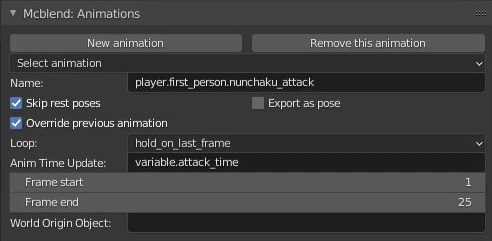
Item attack animation configuration:

Both animations start at frame 1 and end at frane 25. With default Blender
animation framerate this means that they take one second (24 frames) to finish.
This is important because they’re both controlled by variable.attack_time
which returns values between 0 and 1.
Deselect the idle tracks in the NLA editor, create your attack animations (you’ll get best results if the 1st frame of the attack animations will be the same as the idle poses you’ve just made).
This time, for animating switch to pose mode while having both armatures selected. You’ll be able to animate them at the same time. If in the “Dope Sheet” you change from “Action Editor” mode to “Dope Sheet” mode, you’ll be able to see the keyframes for both of the armatures at the same time.
Export the player and item animation and remove all of the comments from the files created before. Now, all of the animations should work in the game.