UV group masks
UV gorup masks can be added in the Mcblend: UV groups menu to configure the process generating textures during automatic UV mapping.
All masks have an eye icon in the upper right corner that can be used to temporarily disable/enable the mask.
Color Palette Mask
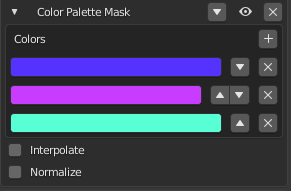
This mask takes the grayscale image as an input and maps its brightness values to a color image with a palette defined as a list of colors.
Properties:
Colors: a list of colors to use in the palette.Interpolate: a toggle that determines whether there should be a smooth transition between the colors in the palette.Normalize: a toggle that normalizes the input values to ensure that the entire palette is used.
Note
If the input image is not grayscale, it will be converted to grayscale before the mask is applied.
Note
The Color Palette Mask cannot be used inside the Mix Mask. If it is placed inside the Mix Mask, it will have no effect.
Gradient Mask
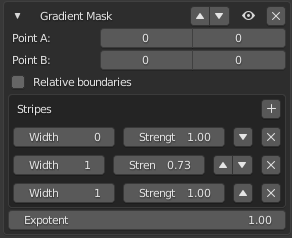
The Gradient Mask generates a grayscale gradient with stripes of different darkness and widths. The direction of the stripes is defined by two points on the texture. The grayscale image is then multiplied by the input image.
Properties:
Point A: the starting point for drawing the gradient stripes.Point B: the end point for drawing the gradient stripes.Relative boundaries: a toggle to determine whether points A and B are passed as absolute values (pixels from the lower left corner of the texture) or as a fraction of the texture size (0.0 is the lower left corner, 1.0 is the upper right corner). Negative absolute values represent the number of pixels from the top right corner, starting at -1.Stripes: a list of stripes in the gradient, including their colors (strengths) and widths. The widths determine the placement of the stripes along a line between points A and B, so the width of the first stripe is usually 0, indicating that it should be drawn at Point A.Exponent: the filter image is raised to this power before it is multiplied by the image.
Ellipse Mask
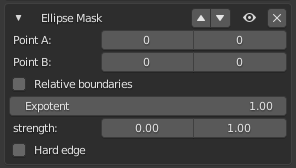
The Ellipse Mask is a tool that creates a grayscale image of an ellipse between points A and B. This image is then multiplied by the input image.
Properties:
Point AandPoint Bdefine the boundaries of the ellipse.The
Relative boundariesproperty determines whether the points are given as absolute values (number of pixels from the lower left corner) or as fractions of the texture size (0.0 lower left corner, 1.0 upper right corner). Negative values represent the number of pixels from the top right corner, starting at -1.The
Exponentproperty determines the power to which the filter image is raised before it is multiplied by the input image.The
Strengthproperty sets the minimum and maximum values of brightness for the filter image.The
Hard edgeproperty determines whether the edges of the ellipse should be smooth or hard.
Rectangle Mask
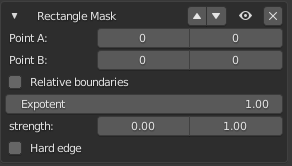
The Rectangle Mask creates a grayscale image of a rectangle between two points, Point A and Point B. This grayscale image is then multiplied by the input image.
Properties:
Point AandPoint B: Opposite corners of the rectangle.Relative boundaries: Whether points A and B should be passed as absolute values (number of pixels from the lower left corner of the texture) or as a fraction of the texture size (0.0 lower left corner, 1.0 upper right corner). The absolute values can also be negative, representing the number of pixels from the top right corner (starting at -1).
Exponent: The filter image is raised to this value before it is multiplied by the input image.Strength: The minimum and maximum values of brightness for the created filter image.Hard edge: Determines whether the edges of the rectangle should be hard or smoothly interpolated towards the edges of the image.
Stripes Mask
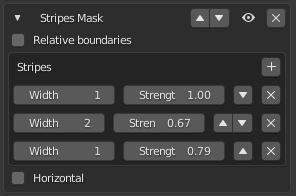
The Stripes Mask creates a grayscale image with repeating stripes of a specified width and brightness. When this grayscale image is multiplied by the input image, it creates a striped effect. The mask has the following properties:
Relative boundaries: Indicates whether the width of the stripes is expressed as a fraction of the image’s width or height.Stripes: A list of the stripes, including their width and brightness.Horizontal: Determines whether the stripes should be vertical or horizontal.
Random Mask
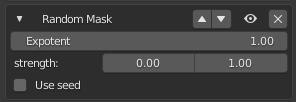
The Random Mask creates a grayscale image with randomly bright pixels (a random noise). When applied, this image is multiplied by the input image. The following properties can be adjusted:
Exponent: the filter image is raised to this power value before being multiplied by the input image.Strength: the minimum and maximum brightness values of the pixels on the filter image.Use seed: allows you to set the seed for the color randomization, allowing for consistent results when using the same seed.
Color Mask
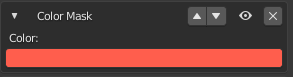
The color mask multiplies the input mask by a color.
Mix Mask
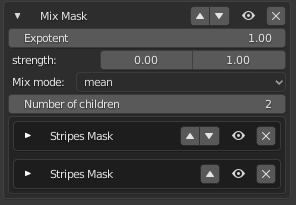
The Mix Mask allows you to mix multiple masks using different methods besides the default multiplication.
Properties:
Exponent: Raises the filter image to the power of this value before multiplying it with the input image.Strength: Defines the minimum and maximum values of brightness for the returned filter image. The brightness values of the filter image are mapped to fit within this range.Mix mode: Determines how to mix the filter images produced by other masks. There are four options: min, max, mean, and median.Number of children: The number of masks being mixed. Takes the masks below this mask and mixes them together.
Note
Mix mask ignores the color palette masks, since the color palette masks do not create a filter image (they just alter the image from the input).