Optimizing Animations
When making animations with Mcblend, you often end up baking some parts of the animation especially when transformations in the animations are driven by something else (physics simulation, inverse kinematics etc.). Minecraft animation storage format is not designed to reduce the size so the animations that use a lot of keyframes often end up being very large.
To counteract this, Mcblend provides an option to optimize the animation during export.
TL;DR: In order to optimize the animation, you need to select the Optimize Animation checkbox in the Object Properties panel under the Mcblend: Animations tab and set the Error margin to a value that is appropriate for your animation. Bigger values will result in smaller files but will also result in less accurate animations. Smaller values will result in larger files but will also result in more accurate animations.
Warning
The animation optimization works only for the linear keyframes. You can read more about the interpolation modes in the Stepped, Linear, and Smooth Interpolation section.
How does it work?
The optimization algorithm used by Mcblend is really simple. Mcblend loops through all keyframes and checks if interpolating between the previous and next keyframe is close enough to the current keyframe. If it is, the current keyframe is removed.

The Error margin is defined as the ratio between the distance moved from current keyframe and its interpolated alternative (a) to the distance moved from the previous keyframe to the next keyframe (b). In the picture you can see that as error=a/b.
Examples
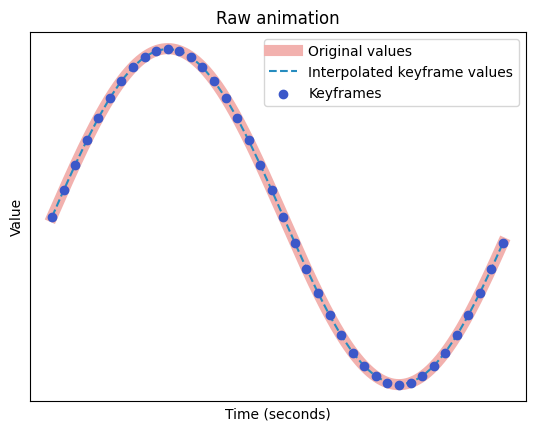
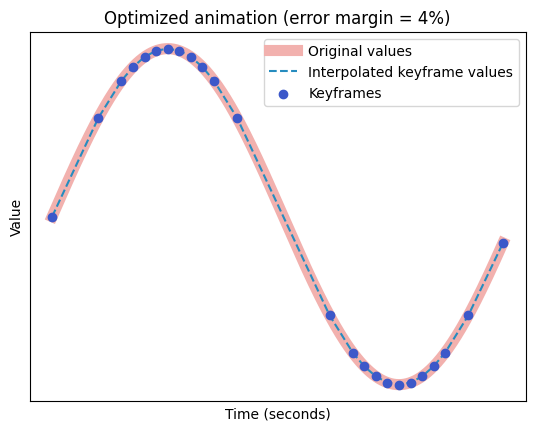
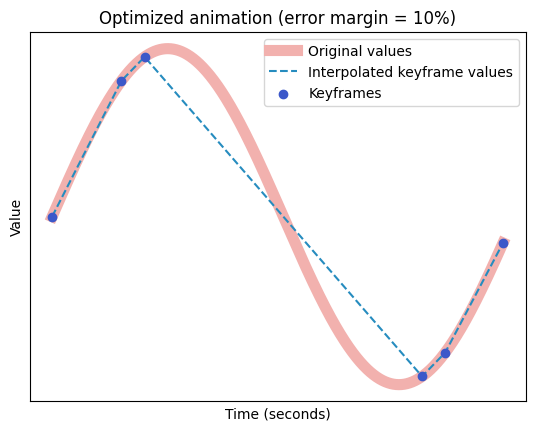
Examples below show how different levels of optimization affect the graph of the animation.