Customizing textures using UV groups
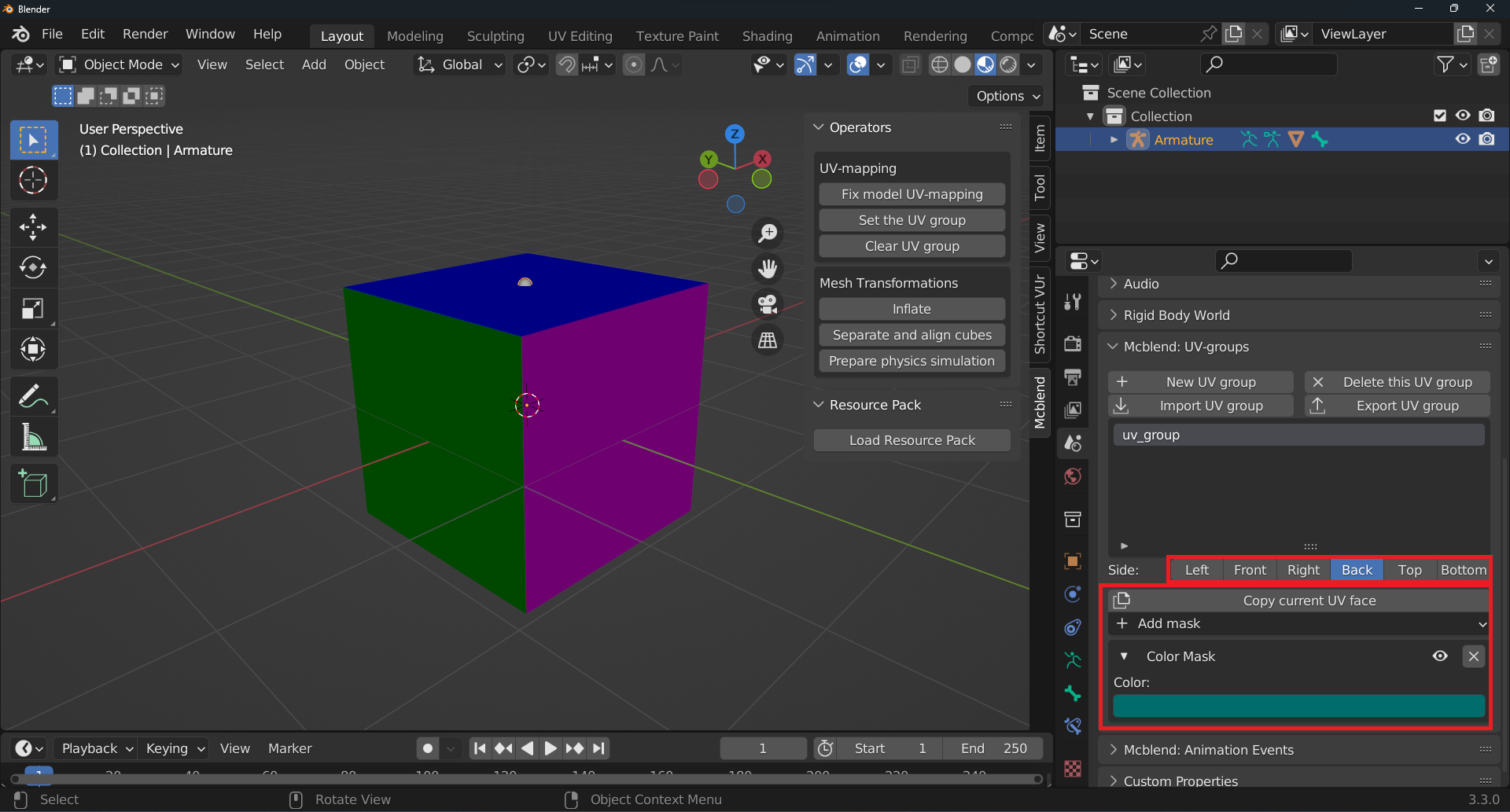
UV groups can be used to customize the appearance of textures in your model. The textures are created using collections of UV masks, with total of six collections available, one for each side of the cube - left, front, right, back, top, and bottom. You can switch between these sides using the Side radio button and configure the appearance of each side using a collection of UV masks. The changes to the UV groups configuration are applied during the automatic UV mapping process, which generates a new texture for your model. Keep in mind that you will need to generate a new texture every time you make changes to the UV group configuration in order to see the updates in your model.
Gold block texture using UV groups (example)
This example demonstrates how to create a texture similar to the vanilla Minecraft gold block using UV groups. Note that this example does not cover every type of UV group available, but it should provide you with a general understanding of how to use them. If you would like to learn more about all the available UV groups, you can find their complete description in the GUI reference section of the documentation.
This tutorial assumes that you already have a basic model created with Mcblend, a default UV group created, and a cube assigned to it. The tutorial begins with a model that has a single cube assigned to a default UV group.
While working with UV groups for texture customization, you will frequently switch between the Object properties and Scene properties panels. The UV group configuration is located in Scene properties, but the button for generating the texture is in Object properties. To make it easier to switch between these panels, you can split the properties panel into two panels. Alternatively, you can use a Blender feature to add the Automatic UV Mapping button to your quick favorites by right-clicking on it and selecting Add to Quick favorites.

It is recommended to work on one side of a UV group and then copy the final result to the other sides if all sides are the same. Begin by switching the color of the front side to gold.
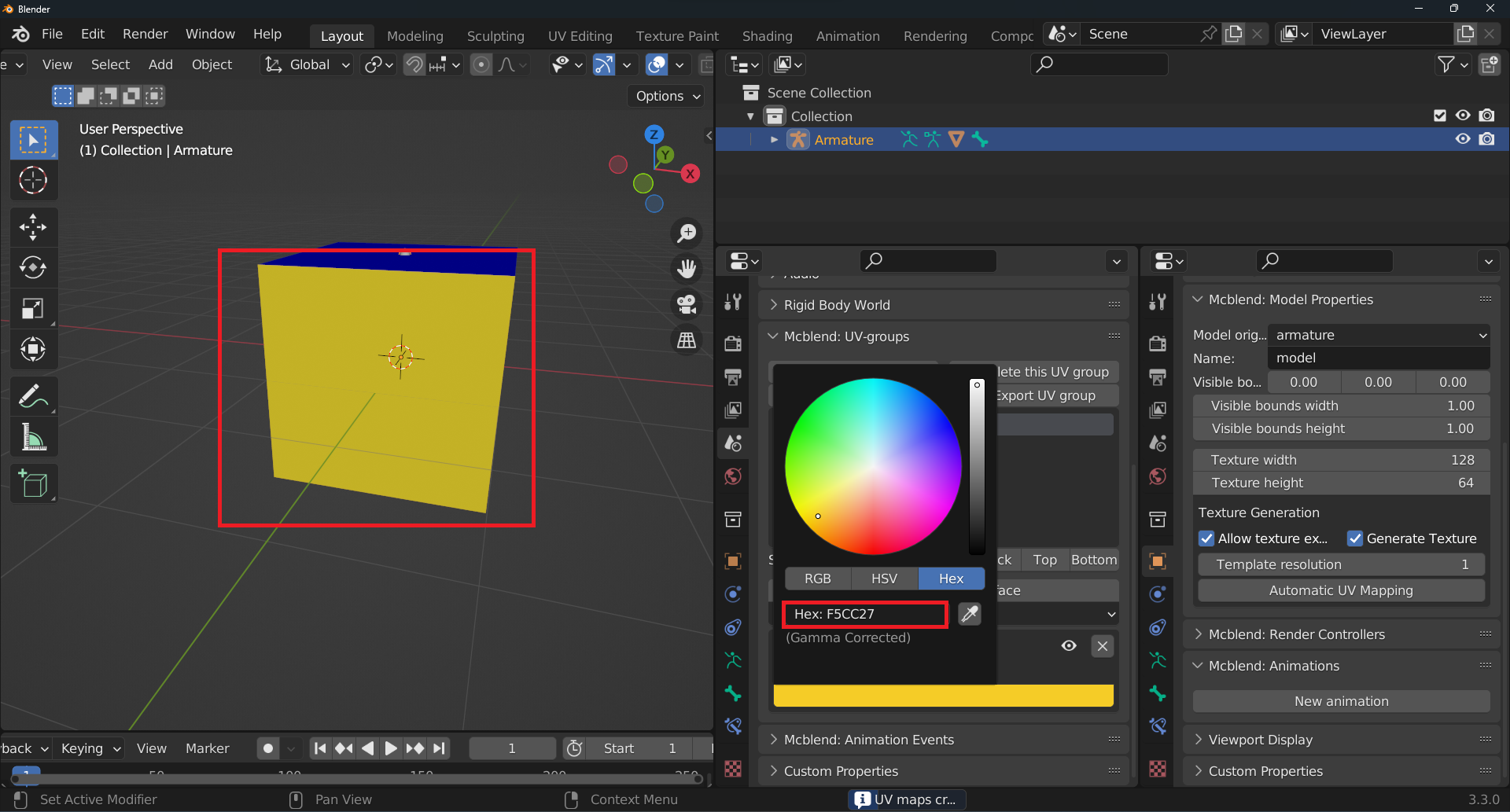
To add more masks, click the Add mask button. For this tutorial, add a Gradient Mask. Keep in mind that when you add a mask, it is added to the end of the list. You can use the arrow buttons next to the mask name to move the mask up or down in the list. If you want to hide the mask information, click the arrow on the left side of the mask name. Make sure that the Gradient Mask is above the Color Mask in the list.
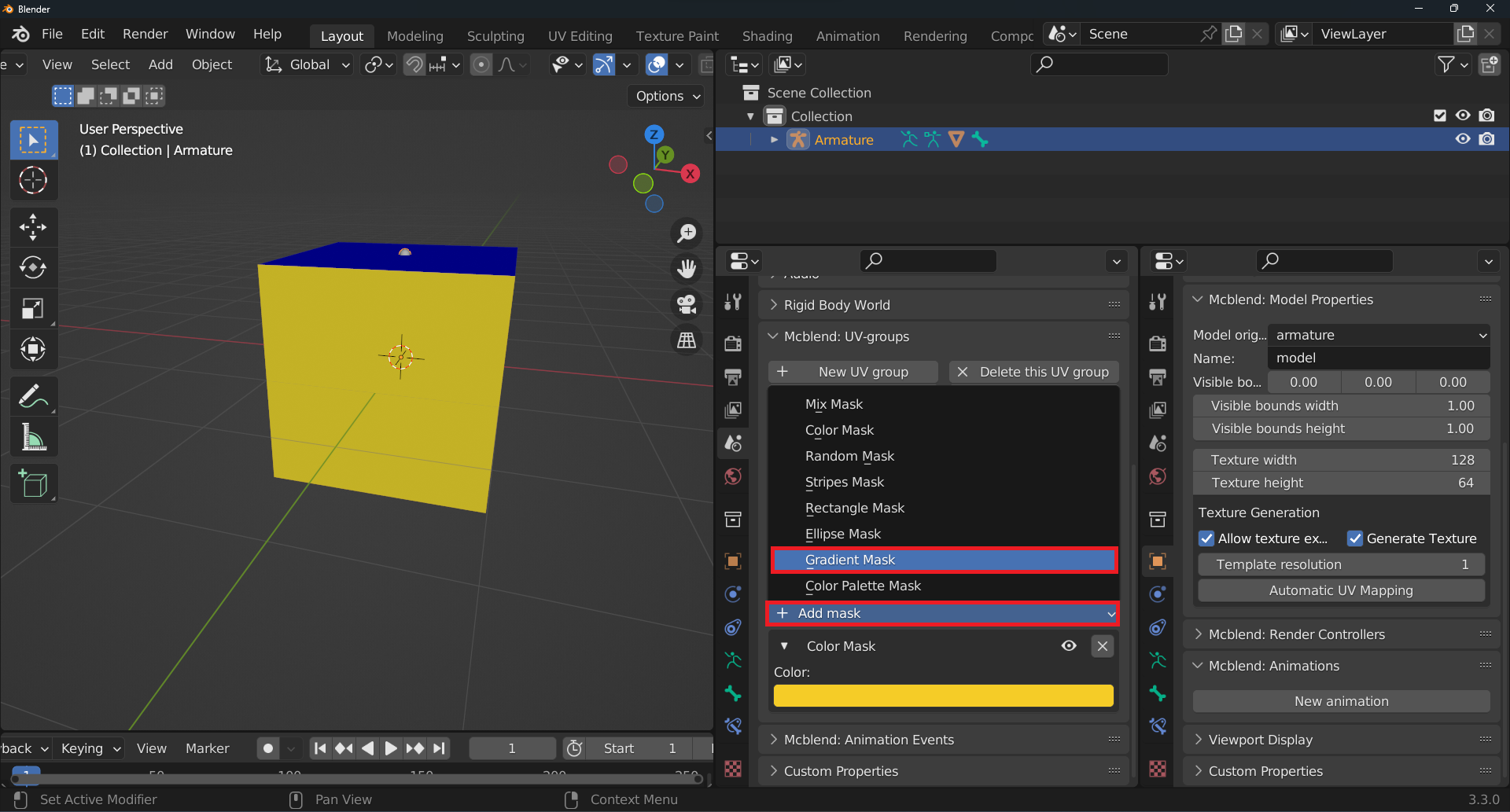
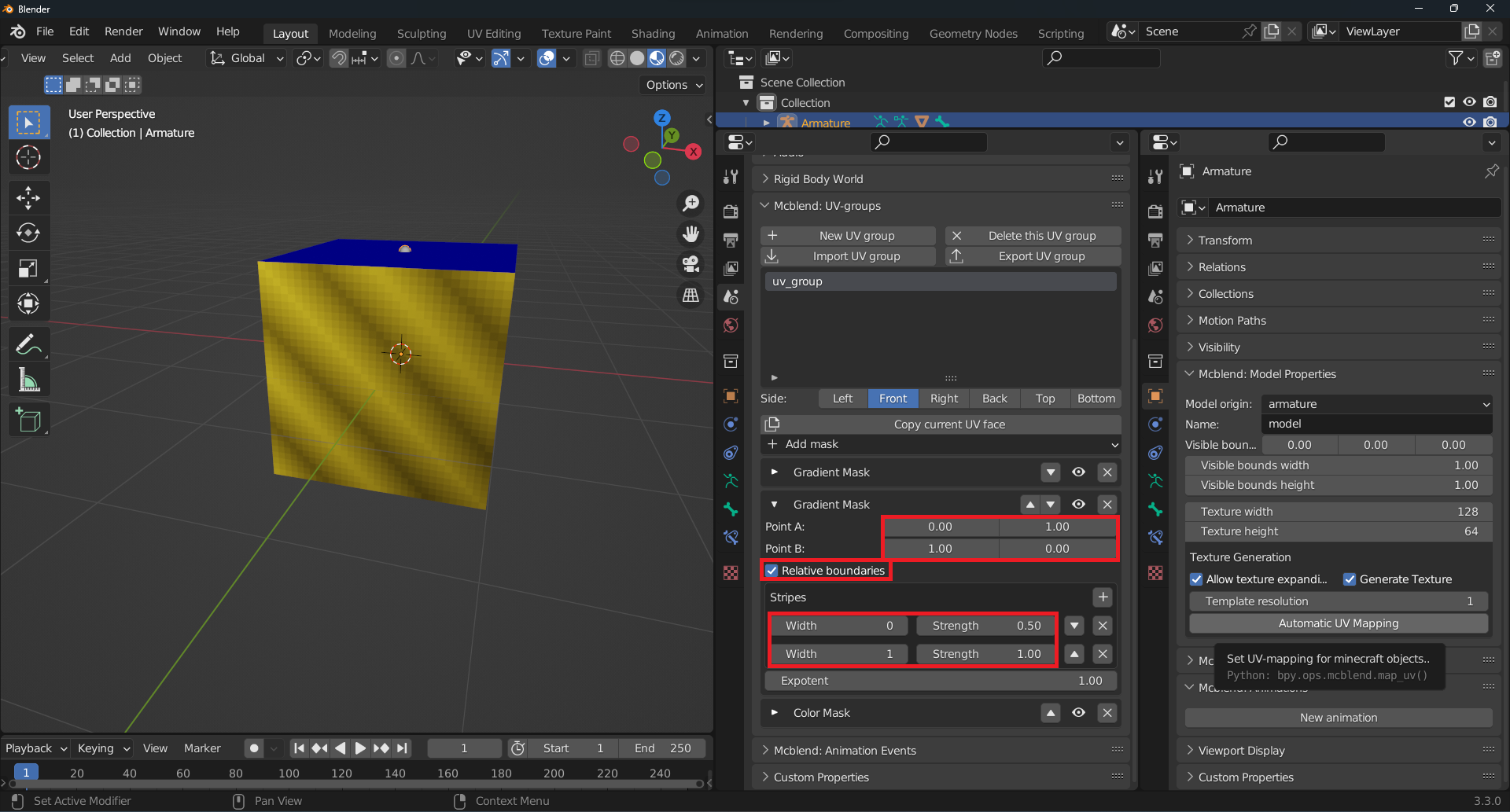
To create the diagonal stripes of a Minecraft gold block texture, you can modify the configuration of the gradient mask. Set the Point A to [0.0, 0.0] (the bottom left corner), and Point B to [1.0, 1.0] (the top right corner). The mask uses Relative boundaries, which means that the coordinates of Point A and Point B are represented as values between 0 and 1 (by default, these values are absolute and represent the number of pixels from the bottom left corner). There are 9 stripes alternating between values 1.0 and 0.5, creating a texture that alternates between brighter and darker colors. The first stripe’s width is set to 0, as the Width value represents a position on the line between Point A and Point B, with 0 being the starting value.
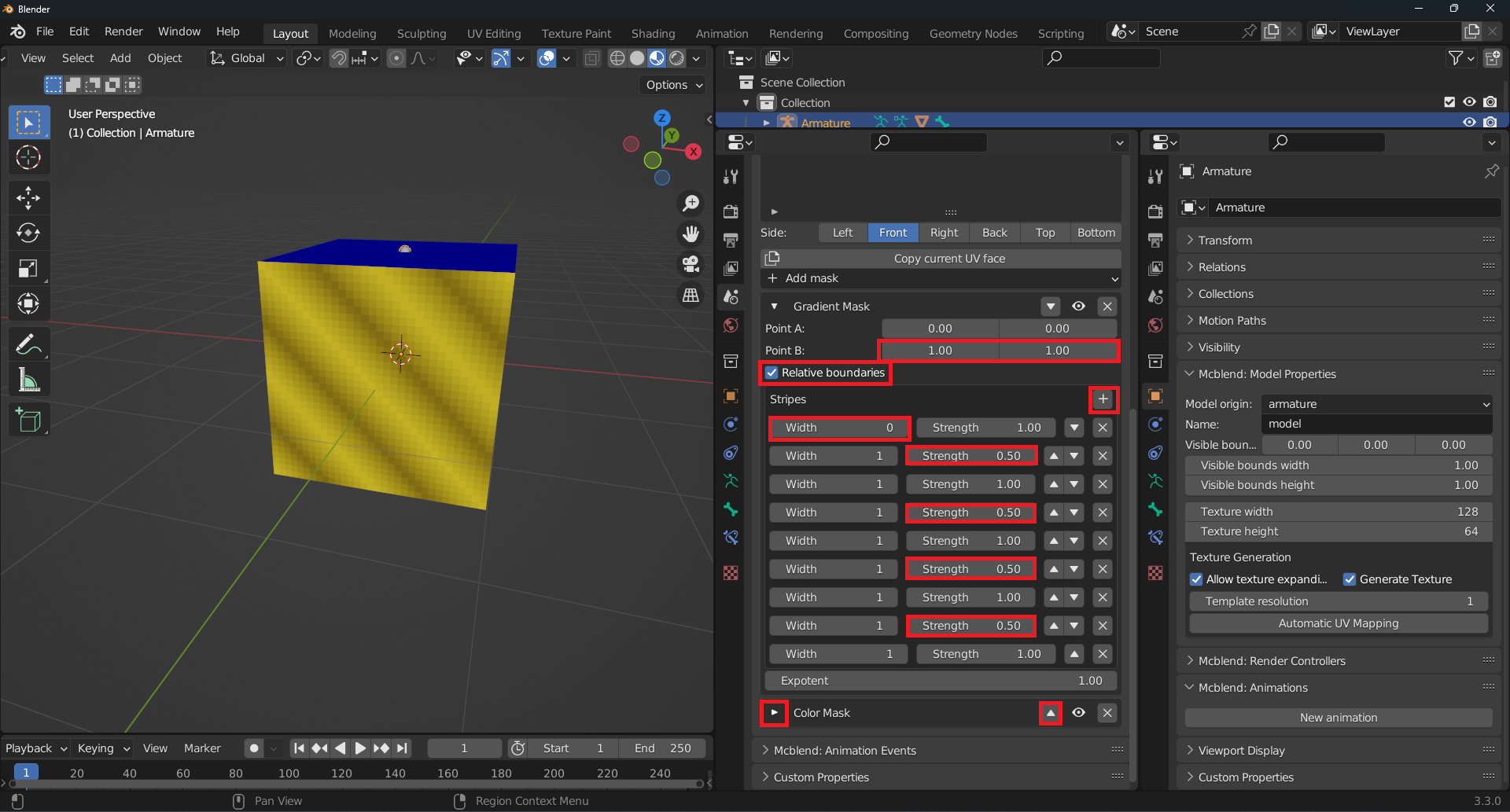
To add a shadow in the bottom right corner, add another Gradient Mask after the one for the stripes.
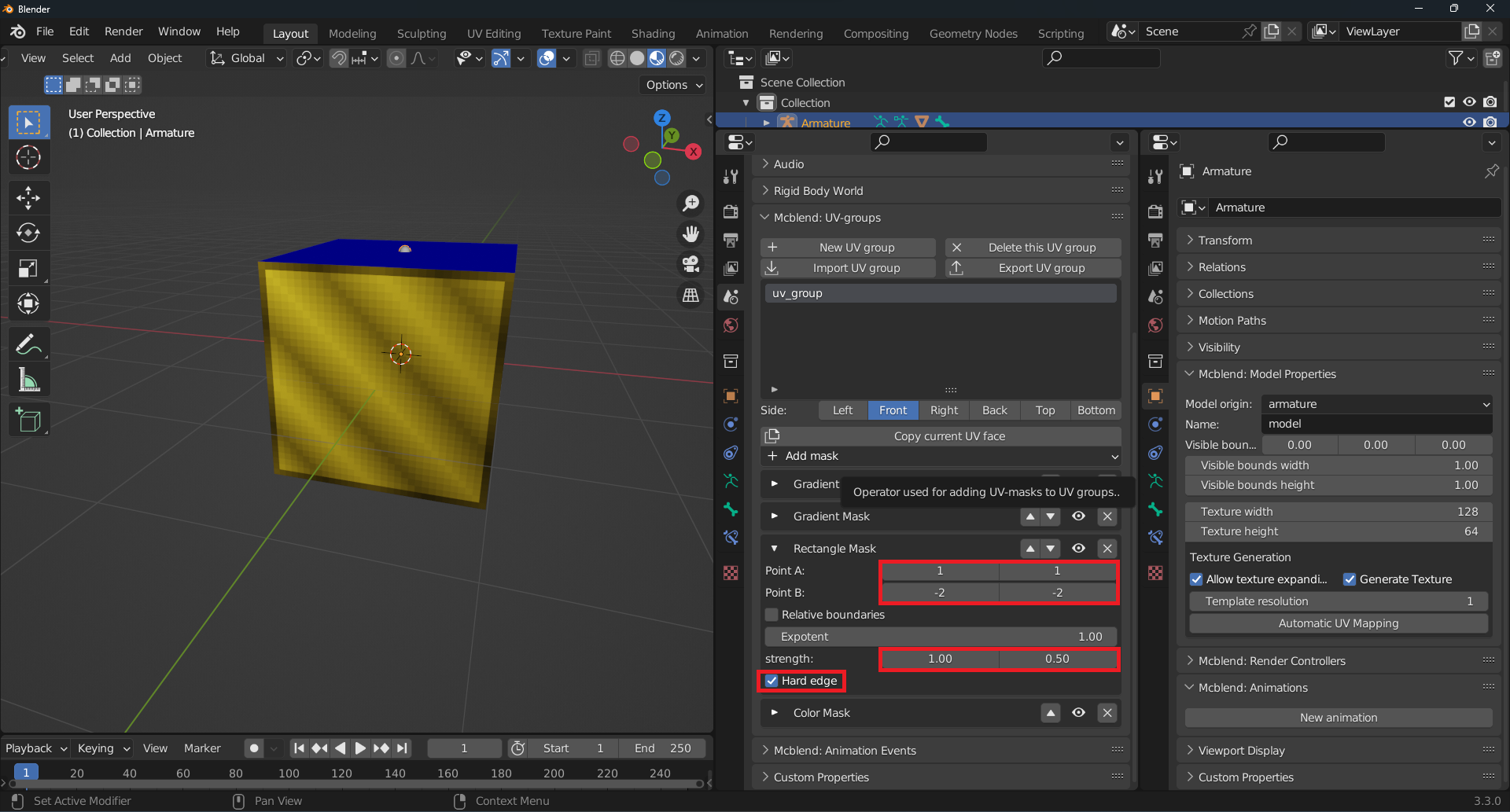
The Rectangle Mask creates a grayscale image of a rectangle between Point A and Point B. The grayscale image is then multiplied by the input image. In this case, the Rectangle Mask is used to add a frame with a width of 1 pixel. It’s not using Relative boundaries, so the coordinates are absolute. The negative values for Point A and Point B are used to count pixels from the opposite corner. -2 represents 1 pixel counting from the top right corner (0 represents the bottom left corner, and -1 represents the top right corner). The rectangle uses Hard edge, which means that the transition between the bright and dark side is instant.
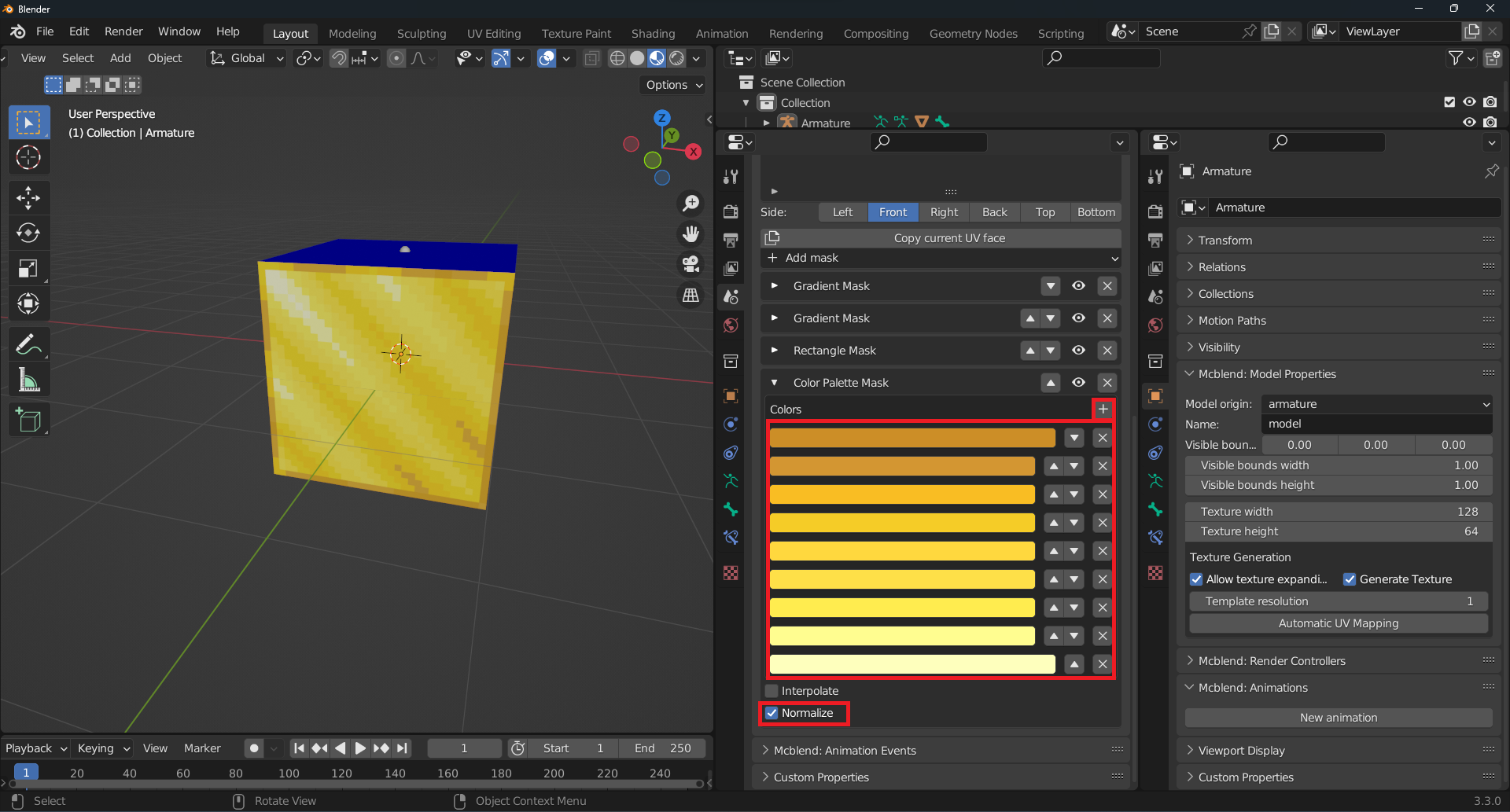
The gold color doesn’t look very good, so let’s remove it and add a Color Palette Mask instead. This mask maps the brightness values of the image to a color image based on a palette defined as a list of colors. By enabling the Normalize option, the input values are normalized so that the entire palette is used. The Interpolate option allows for a smooth transition between the colors in the palette by mapping brightness values to colors that are not defined in the palette based on interpolation between the defined colors. In this case, we are not using the Interpolate option, as our palette has 9 colors, which should be sufficient. The colors in the palette were based on those used in the actual Minecraft gold block texture, which can be extracted using external software like Gimp. The list of colors in our palette is as follows:
#cc8e27
#d39632
#f9bd23
#f5cc27
#ffd83e
#fee048
#ffec4f
#fffd90
#feffbd
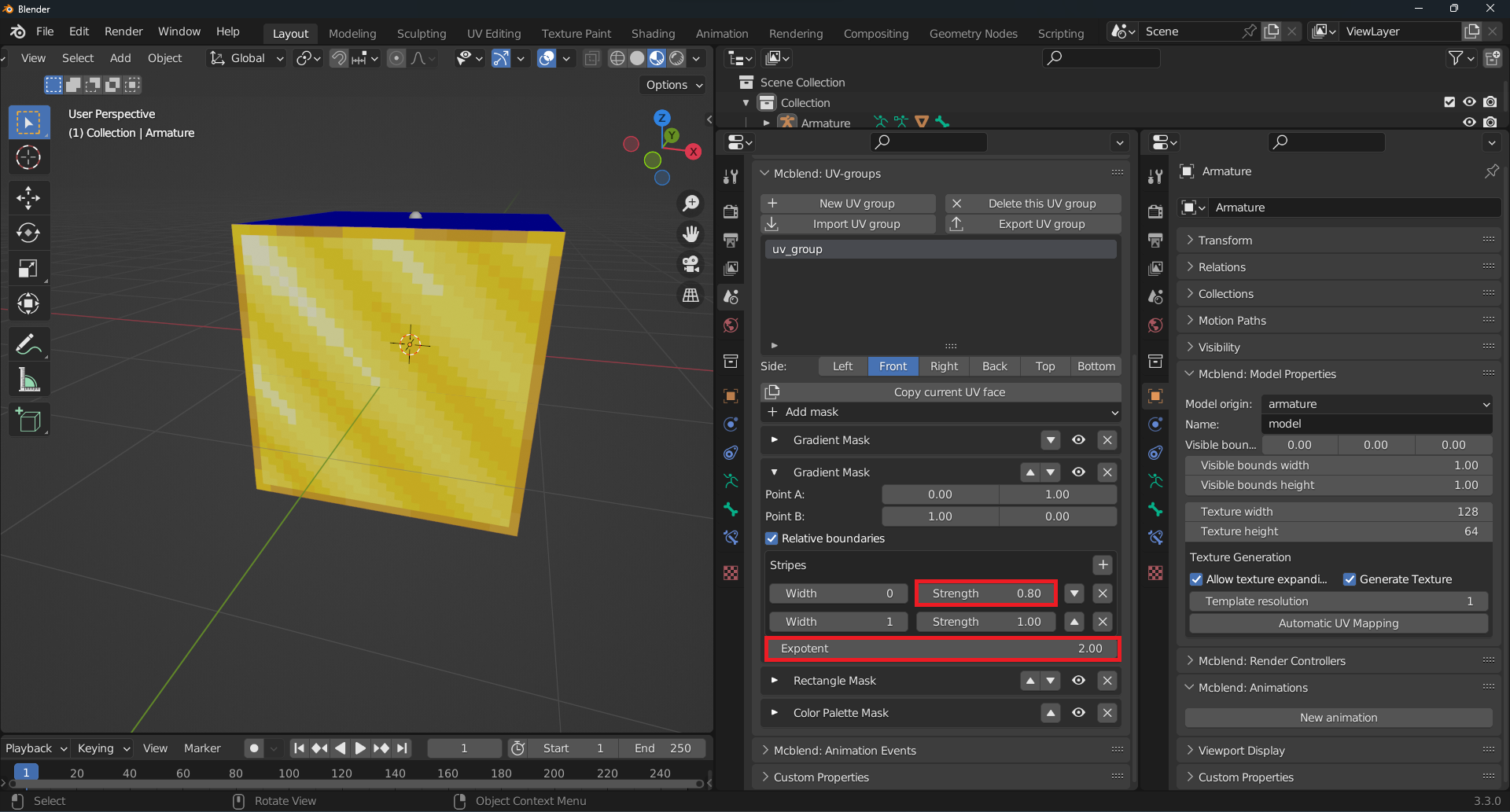
The Gradient Mask used for creating shadows was modified to achieve a more realistic look. The color value for the darker shade was changed to 0.8 and the Exponent was set to 2.0. The exponent value causes the color change to be more sudden, resulting in a more defined shadow. Keep in mind that fine-tuning the settings of the masks may be necessary to achieve the desired result.
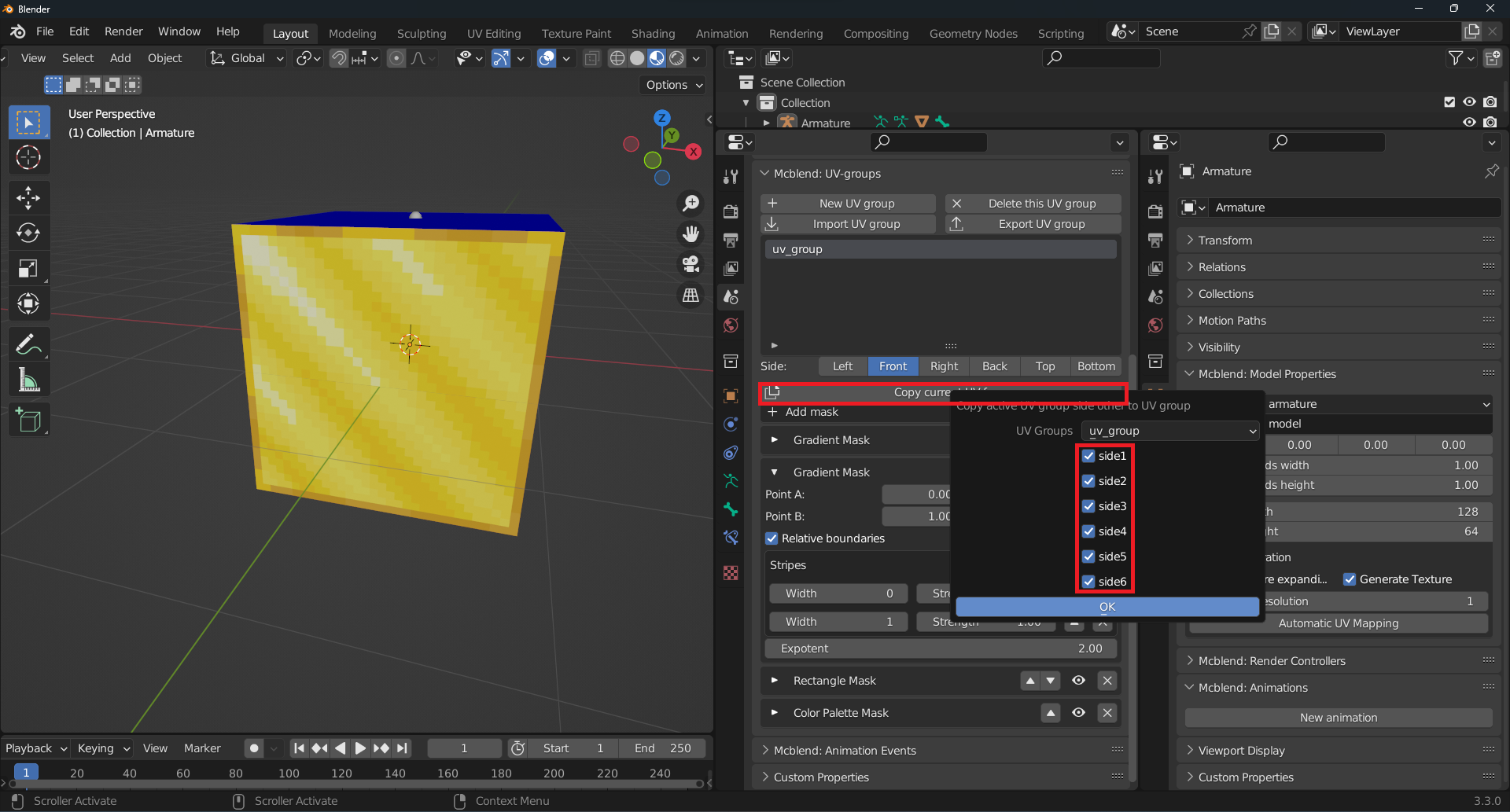
After you have finished defining the texture, you can use the Copy current UV face button to copy it to other faces.
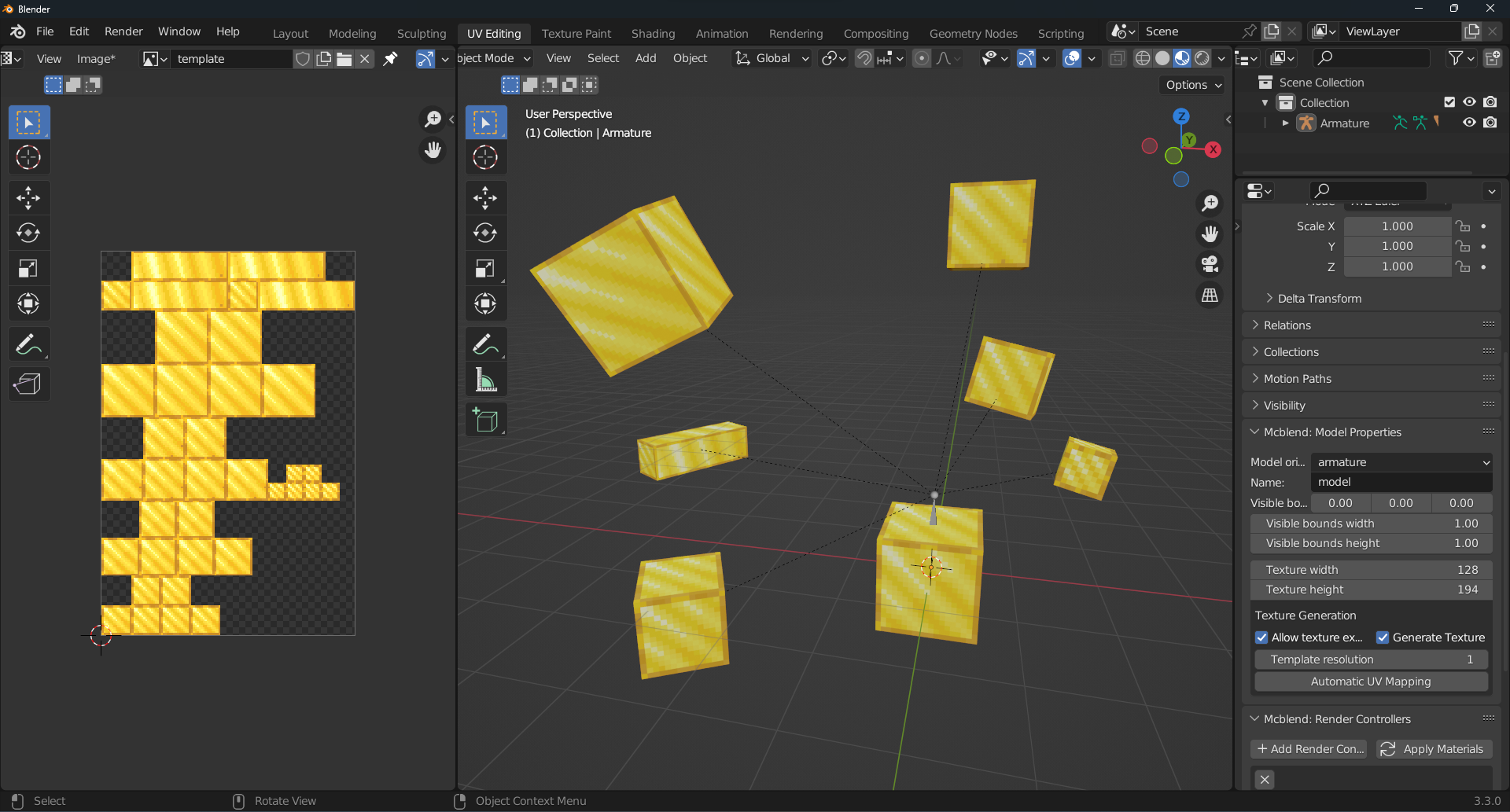
Once you have completed the UV group configuration, you can apply it to cubes of different shapes and sizes and the texture will be automatically generated. This allows you to easily apply the same texture to multiple objects without needing to manually configure each one.
The UV group can be exported to a JSON file for use in other models or projects. The JSON file contains all the configuration details of the UV group, including the masks and their properties. An example of the exported UV group used in this tutorial is provided below for reference. You can import it from the file. Simply click the Import UV group button and select the desired file.
[CLICK] Exported UV group
{
	"version": 1,
	"name": "gold",
	"side1": [
		{
			"mask_type": "Gradient Mask",
			"p1": [0.0, 0.0],
			"p2": [1.0, 1.0],
			"stripes": [
				{
					"strength": 1.0,
					"width": 0.1
				},
				{
					"strength": 0.5,
					"width": 0.1
				},
				{
					"strength": 1.0,
					"width": 0.1
				},
				{
					"strength": 0.5,
					"width": 0.1
				},
				{
					"strength": 1.0,
					"width": 0.1
				},
				{
					"strength": 0.5,
					"width": 0.1
				},
				{
					"strength": 1.0,
					"width": 0.1
				},
				{
					"strength": 0.5,
					"width": 0.1
				},
				{
					"strength": 1.0,
					"width": 0.1
				}
			],
			"relative_boundaries": true,
			"expotent": 1.0
		},
		{
			"mask_type": "Gradient Mask",
			"p1": [0.0, 1.0],
			"p2": [1.0, 0.0],
			"stripes": [
				{
					"strength": 0.800000011920929,
					"width": 0.1
				},
				{
					"strength": 1.0,
					"width": 0.1
				}
			],
			"relative_boundaries": true,
			"expotent": 2.0
		},
		{
			"mask_type": "Rectangle Mask",
			"p1": [1, 1],
			"p2": [-2, -2],
			"relative_boundaries": false,
			"expotent": 1.0,
			"strength": [1.0, 0.5],
			"hard_edge": true
		},
		{
			"mask_type": "Color Palette Mask",
			"colors": [
				[0.60382724, 0.27049762, 0.02028864],
				[0.65140569, 0.3049871, 0.03189614],
				[0.94730628, 0.50888097, 0.01680754],
				[0.91309863, 0.60382688, 0.02028875],
				[1.0, 0.68668491, 0.04817205],
				[0.9911015, 0.74540383, 0.06480349],
				[1.0, 0.83879864, 0.07818766],
				[1.0, 0.98224992, 0.27889451],
				[0.99110109, 1.0, 0.50888151]
			],
			"interpolate": false,
			"normalize": true
		}
	],
	"side2": [
		{
			"mask_type": "Gradient Mask",
			"p1": [0.0, 0.0],
			"p2": [1.0, 1.0],
			"stripes": [
				{
					"strength": 1.0,
					"width": 0.1
				},
				{
					"strength": 0.5,
					"width": 0.1
				},
				{
					"strength": 1.0,
					"width": 0.1
				},
				{
					"strength": 0.5,
					"width": 0.1
				},
				{
					"strength": 1.0,
					"width": 0.1
				},
				{
					"strength": 0.5,
					"width": 0.1
				},
				{
					"strength": 1.0,
					"width": 0.1
				},
				{
					"strength": 0.5,
					"width": 0.1
				},
				{
					"strength": 1.0,
					"width": 0.1
				}
			],
			"relative_boundaries": true,
			"expotent": 1.0
		},
		{
			"mask_type": "Gradient Mask",
			"p1": [0.0, 1.0],
			"p2": [1.0, 0.0],
			"stripes": [
				{
					"strength": 0.800000011920929,
					"width": 0.1
				},
				{
					"strength": 1.0,
					"width": 0.1
				}
			],
			"relative_boundaries": true,
			"expotent": 2.0
		},
		{
			"mask_type": "Rectangle Mask",
			"p1": [1, 1],
			"p2": [-2, -2],
			"relative_boundaries": false,
			"expotent": 1.0,
			"strength": [1.0, 0.5],
			"hard_edge": true
		},
		{
			"mask_type": "Color Palette Mask",
			"colors": [
				[0.60382724, 0.27049762, 0.02028864],
				[0.65140569, 0.3049871, 0.03189614],
				[0.94730628, 0.50888097, 0.01680754],
				[0.91309863, 0.60382688, 0.02028875],
				[1.0, 0.68668491, 0.04817205],
				[0.9911015, 0.74540383, 0.06480349],
				[1.0, 0.83879864, 0.07818766],
				[1.0, 0.98224992, 0.27889451],
				[0.99110109, 1.0, 0.50888151]
			],
			"interpolate": false,
			"normalize": true
		}
	],
	"side3": [
		{
			"mask_type": "Gradient Mask",
			"p1": [0.0, 0.0],
			"p2": [1.0, 1.0],
			"stripes": [
				{
					"strength": 1.0,
					"width": 0.1
				},
				{
					"strength": 0.5,
					"width": 0.1
				},
				{
					"strength": 1.0,
					"width": 0.1
				},
				{
					"strength": 0.5,
					"width": 0.1
				},
				{
					"strength": 1.0,
					"width": 0.1
				},
				{
					"strength": 0.5,
					"width": 0.1
				},
				{
					"strength": 1.0,
					"width": 0.1
				},
				{
					"strength": 0.5,
					"width": 0.1
				},
				{
					"strength": 1.0,
					"width": 0.1
				}
			],
			"relative_boundaries": true,
			"expotent": 1.0
		},
		{
			"mask_type": "Gradient Mask",
			"p1": [0.0, 1.0],
			"p2": [1.0, 0.0],
			"stripes": [
				{
					"strength": 0.800000011920929,
					"width": 0.1
				},
				{
					"strength": 1.0,
					"width": 0.1
				}
			],
			"relative_boundaries": true,
			"expotent": 2.0
		},
		{
			"mask_type": "Rectangle Mask",
			"p1": [1, 1],
			"p2": [-2, -2],
			"relative_boundaries": false,
			"expotent": 1.0,
			"strength": [1.0, 0.5],
			"hard_edge": true
		},
		{
			"mask_type": "Color Palette Mask",
			"colors": [
				[0.60382724, 0.27049762, 0.02028864],
				[0.65140569, 0.3049871, 0.03189614],
				[0.94730628, 0.50888097, 0.01680754],
				[0.91309863, 0.60382688, 0.02028875],
				[1.0, 0.68668491, 0.04817205],
				[0.9911015, 0.74540383, 0.06480349],
				[1.0, 0.83879864, 0.07818766],
				[1.0, 0.98224992, 0.27889451],
				[0.99110109, 1.0, 0.50888151]
			],
			"interpolate": false,
			"normalize": true
		}
	],
	"side4": [
		{
			"mask_type": "Gradient Mask",
			"p1": [0.0, 0.0],
			"p2": [1.0, 1.0],
			"stripes": [
				{
					"strength": 1.0,
					"width": 0.1
				},
				{
					"strength": 0.5,
					"width": 0.1
				},
				{
					"strength": 1.0,
					"width": 0.1
				},
				{
					"strength": 0.5,
					"width": 0.1
				},
				{
					"strength": 1.0,
					"width": 0.1
				},
				{
					"strength": 0.5,
					"width": 0.1
				},
				{
					"strength": 1.0,
					"width": 0.1
				},
				{
					"strength": 0.5,
					"width": 0.1
				},
				{
					"strength": 1.0,
					"width": 0.1
				}
			],
			"relative_boundaries": true,
			"expotent": 1.0
		},
		{
			"mask_type": "Gradient Mask",
			"p1": [0.0, 1.0],
			"p2": [1.0, 0.0],
			"stripes": [
				{
					"strength": 0.800000011920929,
					"width": 0.1
				},
				{
					"strength": 1.0,
					"width": 0.1
				}
			],
			"relative_boundaries": true,
			"expotent": 2.0
		},
		{
			"mask_type": "Rectangle Mask",
			"p1": [1, 1],
			"p2": [-2, -2],
			"relative_boundaries": false,
			"expotent": 1.0,
			"strength": [1.0, 0.5],
			"hard_edge": true
		},
		{
			"mask_type": "Color Palette Mask",
			"colors": [
				[0.60382724, 0.27049762, 0.02028864],
				[0.65140569, 0.3049871, 0.03189614],
				[0.94730628, 0.50888097, 0.01680754],
				[0.91309863, 0.60382688, 0.02028875],
				[1.0, 0.68668491, 0.04817205],
				[0.9911015, 0.74540383, 0.06480349],
				[1.0, 0.83879864, 0.07818766],
				[1.0, 0.98224992, 0.27889451],
				[0.99110109, 1.0, 0.50888151]
			],
			"interpolate": false,
			"normalize": true
		}
	],
	"side5": [
		{
			"mask_type": "Gradient Mask",
			"p1": [0.0, 0.0],
			"p2": [1.0, 1.0],
			"stripes": [
				{
					"strength": 1.0,
					"width": 0.1
				},
				{
					"strength": 0.5,
					"width": 0.1
				},
				{
					"strength": 1.0,
					"width": 0.1
				},
				{
					"strength": 0.5,
					"width": 0.1
				},
				{
					"strength": 1.0,
					"width": 0.1
				},
				{
					"strength": 0.5,
					"width": 0.1
				},
				{
					"strength": 1.0,
					"width": 0.1
				},
				{
					"strength": 0.5,
					"width": 0.1
				},
				{
					"strength": 1.0,
					"width": 0.1
				}
			],
			"relative_boundaries": true,
			"expotent": 1.0
		},
		{
			"mask_type": "Gradient Mask",
			"p1": [0.0, 1.0],
			"p2": [1.0, 0.0],
			"stripes": [
				{
					"strength": 0.800000011920929,
					"width": 0.1
				},
				{
					"strength": 1.0,
					"width": 0.1
				}
			],
			"relative_boundaries": true,
			"expotent": 2.0
		},
		{
			"mask_type": "Rectangle Mask",
			"p1": [1, 1],
			"p2": [-2, -2],
			"relative_boundaries": false,
			"expotent": 1.0,
			"strength": [1.0, 0.5],
			"hard_edge": true
		},
		{
			"mask_type": "Color Palette Mask",
			"colors": [
				[0.60382724, 0.27049762, 0.02028864],
				[0.65140569, 0.3049871, 0.03189614],
				[0.94730628, 0.50888097, 0.01680754],
				[0.91309863, 0.60382688, 0.02028875],
				[1.0, 0.68668491, 0.04817205],
				[0.9911015, 0.74540383, 0.06480349],
				[1.0, 0.83879864, 0.07818766],
				[1.0, 0.98224992, 0.27889451],
				[0.99110109, 1.0, 0.50888151]
			],
			"interpolate": false,
			"normalize": true
		}
	],
	"side6": [
		{
			"mask_type": "Gradient Mask",
			"p1": [0.0, 0.0],
			"p2": [1.0, 1.0],
			"stripes": [
				{
					"strength": 1.0,
					"width": 0.1
				},
				{
					"strength": 0.5,
					"width": 0.1
				},
				{
					"strength": 1.0,
					"width": 0.1
				},
				{
					"strength": 0.5,
					"width": 0.1
				},
				{
					"strength": 1.0,
					"width": 0.1
				},
				{
					"strength": 0.5,
					"width": 0.1
				},
				{
					"strength": 1.0,
					"width": 0.1
				},
				{
					"strength": 0.5,
					"width": 0.1
				},
				{
					"strength": 1.0,
					"width": 0.1
				}
			],
			"relative_boundaries": true,
			"expotent": 1.0
		},
		{
			"mask_type": "Gradient Mask",
			"p1": [0.0, 1.0],
			"p2": [1.0, 0.0],
			"stripes": [
				{
					"strength": 0.800000011920929,
					"width": 0.1
				},
				{
					"strength": 1.0,
					"width": 0.1
				}
			],
			"relative_boundaries": true,
			"expotent": 2.0
		},
		{
			"mask_type": "Rectangle Mask",
			"p1": [1, 1],
			"p2": [-2, -2],
			"relative_boundaries": false,
			"expotent": 1.0,
			"strength": [1.0, 0.5],
			"hard_edge": true
		},
		{
			"mask_type": "Color Palette Mask",
			"colors": [
				[0.60382724, 0.27049762, 0.02028864],
				[0.65140569, 0.3049871, 0.03189614],
				[0.94730628, 0.50888097, 0.01680754],
				[0.91309863, 0.60382688, 0.02028875],
				[1.0, 0.68668491, 0.04817205],
				[0.9911015, 0.74540383, 0.06480349],
				[1.0, 0.83879864, 0.07818766],
				[1.0, 0.98224992, 0.27889451],
				[0.99110109, 1.0, 0.50888151]
			],
			"interpolate": false,
			"normalize": true
		}
	]
}