Exporting camera animations
Mcblend can export camera movement and field of view (FOV) animations from Blender as a JavaScript file. A common use case for this feature is creating cutscenes.
The exported file is a simple data source. It contains a single object that describes how a camera in-game should move and change FOV over time. You can play that data using the Minecraft Script API. A script for that is included in the last section of this page.
Animating the camera in Blender
Before exporting, animate a camera in Blender. Mcblend uses movement, rotation, and Field of View during camera animation export. It reads keyframes from the camera’s active action and from unmuted NLA strips, using the same rules as entity animation export.
The exported time range is defined by the scene’s Frame Start and Frame End settings. Timestamps in the exported file are calculated from the scene framerate (Output Properties > Frame Rate). For cleaner timestamp values in the output, consider matching the scene framerate to a value that divides evenly into one second (for example 20 or 25 FPS instead of the default of 24).
Interpolation modes on keyframes are mapped to Minecraft camera interpolation the same way as for entity animations. See Stepped, Linear, and Smooth Interpolation for how Blender interpolation modes affect the export.
Note
It is recommended to use mostly linear keyframes for camera animations. Linear interpolation follows the Blender preview most closely in Minecraft. Smooth (Bézier) keyframes can produce slightly inaccurate results after export.
Note
It is recommended to switch interpolation modes as rarely as possible. Camera animations in Minecraft are based on splines, and every spline can have only one interpolation mode. Whenever you switch the interpolation mode during your animation, Mcblend has to generate a separate spline in the output. The Minecraft script then has to play each spline as a separate animation, which may be noticeable in some cases.
Animating field of view
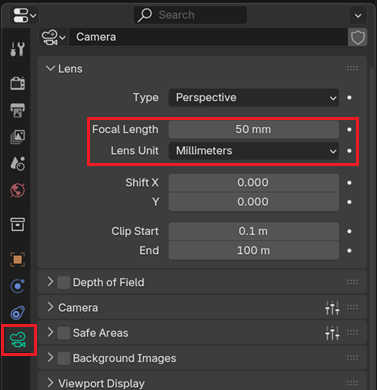
To animate FOV, select the camera, open the Camera tab in the Properties editor, and find the lens settings under Lens:
If
Lens Unitis set toField of View, the value is shown asField of View.If
Lens Unitis set toMillimeters, the value is shown asFocal Length.
You can use these properties to adjust the field of view. When you find the configuration you like, simply switch Lens Unit to Millimeters and add a keyframe by hovering over the value in the UI with your mouse and pressing I.
Note
Blender only lets you keyframe the field of view when Lens Unit is set to Millimeters. In Field of View mode you can edit the angle directly, but you cannot insert keyframes on it (by pressing I).
Note
FOV values are clamped to the range allowed by Minecraft (30° to 110°). If a keyframe falls outside that range, Mcblend adjusts it and reports a warning during export. This is caused by Minecraft limitations.
Exporting a camera animation
Exporting a camera animation follows the same general steps as exporting a single entity animation:
Select the camera you want to export.
Choose
File > Export > Export Bedrock Camera Scriptfrom the menu.Pick the destination path for the
.jsfile.
The operator is only available when a camera object is selected in Object mode.
Playing camera animations in Minecraft
The exported file itself only contains the animation description. You still need game logic that applies it to a player’s camera.
You can use one of the scripts below (click to reveal). They are available in TypeScript and JavaScript versions, depending on your needs.
[CLICK] McblendCameraAnimationRunner (TypeScript)
import {
    system,
    LinearSpline,
    CatmullRomSpline,
    Vector3,
    ProgressKeyFrame,
    RotationKeyFrame,
    Player,
    EasingType,
} from "@minecraft/server";

export interface McblendCameraMoveSpline {
    totalTimeSeconds: number;
    interpolation: "linear" | "smooth";
    controlPoints: Vector3[];
    progressKeyFrames: ProgressKeyFrame[];
    rotationKeyFrames: RotationKeyFrame[];
}

export interface McblendCameraFovKeyframe {
    timeSeconds: number;
    fov: number;
    interpolation: "smooth" | "step" | "linear";
}

export interface McblendCameraAnimation {
    totalTimeSeconds: number;
    fov: McblendCameraFovKeyframe[];
    movement: McblendCameraMoveSpline[];
}

export class McblendCameraAnimationRunner {
    private readonly cameraAnimation: McblendCameraAnimation;
    private readonly player: Player;
    private readonly location: Vector3;

    private moveRunId?: number;
    private fovRunId?: number;

    constructor(
        player: Player,
        location: Vector3,
        cameraAnimation: McblendCameraAnimation,
    ) {
        this.player = player;
        this.location = location;
        this.cameraAnimation = cameraAnimation;
    }

    /** Starts playing the animation for the player. */
    start() {
        // Move animation
        if (this.cameraAnimation.movement.length > 0) {
            this.startMove([...this.cameraAnimation.movement]);
        }

        // Fov animation
        if (this.cameraAnimation.fov.length === 0) {
            return;
        }
        // Add last FOV frame that matches the animation duration
        const fovFrames = [...this.cameraAnimation.fov];
        const lastFovFrame = fovFrames[fovFrames.length - 1];
        if (lastFovFrame.timeSeconds < this.cameraAnimation.totalTimeSeconds) {
            fovFrames.push({
                timeSeconds: this.cameraAnimation.totalTimeSeconds,
                fov: lastFovFrame.fov,
                interpolation: "step",
            });
        }
        // FOV animatino starts 1 tick later, otherwise the FOV change might
        // not apply correctly
        const now = Date.now();
        this.fovRunId = system.runTimeout(() => {
            this.startFov(fovFrames, now);
        }, 1);
    }

    /**
     * Stops playing the animation. Lets you choose whether the camera and
     * and FOV should also be cleared after stopping the animation.
     */
    stop(clearPlayerCamera: boolean = true, clearPlayerFov: boolean = true) {
        if (this.moveRunId !== undefined) {
            system.clearRun(this.moveRunId);
            this.moveRunId = undefined;
        }
        if (this.fovRunId !== undefined) {
            system.clearRun(this.fovRunId);
            this.fovRunId = undefined;
        }
        if (clearPlayerCamera) {
            this.player.camera.clear();
        }
        if (clearPlayerFov) {
            this.player.camera.setFov();
        }
    }

    private startMove(cameraAnimations: McblendCameraMoveSpline[]) {
        const { x, y, z } = this.location;
        const cameraAnimation = cameraAnimations[0];
        const splines = new LinearSpline();
        cameraAnimation.interpolation === "linear"
            ? new LinearSpline()
            : new CatmullRomSpline();
        const camera = this.player.camera;
        splines.controlPoints = cameraAnimation.controlPoints.map(
            ({ x: xx, y: yy, z: zz }) => ({
                x: x + xx,
                y: y + yy,
                z: z + zz,
            }),
        );
        const totalTimeSeconds = cameraAnimation.totalTimeSeconds;
        const lastRotation = cameraAnimation.rotationKeyFrames.at(-1)!.rotation;
        // Start with camera set to the last frame of the spline animation, to
        // for better blending between splines
        camera.setCamera("minecraft:free", {
            location: splines.controlPoints.at(-1)!,
            // setCamera defines rotation differently form playAnimation,
            // unfortunately there is no Z for rolling
            rotation: {
                x: -lastRotation.x,
                y: -lastRotation.y + 180,
            },
        });
        camera.playAnimation(splines, {
            totalTimeSeconds: totalTimeSeconds,
            animation: {
                progressKeyFrames: cameraAnimation.progressKeyFrames,
                rotationKeyFrames: cameraAnimation.rotationKeyFrames,
            },
        });
        // Use Date to synchronize the splines more accurately than based on
        // ticks.
        const endTime = Date.now() + totalTimeSeconds * 1000 + 1;
        this.moveRunId = system.runInterval(() => {
            if (endTime > Date.now()) {
                return;
            }
            if (this.moveRunId !== undefined) {
                system.clearRun(this.moveRunId);
                this.moveRunId = undefined;
            }
            const remainingAnimations = cameraAnimations.slice(1);
            if (remainingAnimations.length > 0) {
                this.startMove(remainingAnimations);
            } else {
                system.runTimeout(() => {
                    this.stop();
                }, 1);
            }
        });
    }

    private startFov(
        cameraAnimations: McblendCameraFovKeyframe[],
        startTime: number,
        lastFov?: number,
    ) {
        let lastSkippedStep: McblendCameraFovKeyframe | undefined = undefined;
        const now = Date.now();
        const camera = this.player.camera;
        while (
            cameraAnimations.length > 0 &&
            now + cameraAnimations[0].timeSeconds <= startTime
        ) {
            lastSkippedStep = cameraAnimations.shift()!;
        }
        if (lastSkippedStep !== undefined) {
            const newFov = lastSkippedStep.fov;
            if (lastFov !== newFov) {
                camera.setFov({ fov: lastSkippedStep.fov });
            }
        }
        if (cameraAnimations.length === 0) {
            return;
        }
        const cameraAnimation = cameraAnimations.shift()!;
        const endTime = startTime + cameraAnimation.timeSeconds * 1000;
        const interpolation = cameraAnimation.interpolation;
        const newFov = cameraAnimation.fov;
        if (interpolation !== "step" && lastFov !== newFov) {
            // "runInterval" below handles the FOV changed in "step"
            // interpolation mode.
            camera.setFov({
                fov: newFov,
                easeOptions: {
                    easeType:
                        interpolation == "linear"
                            ? EasingType.Linear
                            : EasingType.InOutQuad,
                    easeTime: Math.max((endTime - now) / 1000 - 0.05, 0.0),
                },
            });
        }
        this.fovRunId = system.runInterval(() => {
            if (endTime > Date.now()) {
                return;
            }
            // Set to the expected FOV. It's important sometimes, when
            // the interpolated animation doesn't finish in time.
            if (lastFov !== newFov) {
                camera.setFov({ fov: newFov });
            }
            if (this.fovRunId !== undefined) {
                system.clearRun(this.fovRunId);
                this.fovRunId = undefined;
            }
            if (cameraAnimations.length === 0) {
                camera.setFov(); // Clear fov
                return;
            }
            this.startFov(cameraAnimations, startTime, newFov);
        });
    }
}
[CLICK] McblendCameraAnimationRunner (JavaScript)
// @ts-check
import {
    system,
    LinearSpline,
    CatmullRomSpline,
    Player,
    EasingType,
} from "@minecraft/server";

/** @typedef {import("@minecraft/server").Vector3} Vector3 */
/** @typedef {import("@minecraft/server").ProgressKeyFrame} ProgressKeyFrame */
/** @typedef {import("@minecraft/server").RotationKeyFrame} RotationKeyFrame */

/**
 * @typedef {object} McblendCameraMoveSpline
 * @property {number} totalTimeSeconds
 * @property {"linear" | "smooth"} interpolation
 * @property {Vector3[]} controlPoints
 * @property {ProgressKeyFrame[]} progressKeyFrames
 * @property {RotationKeyFrame[]} rotationKeyFrames
 */

/**
 * @typedef {object} McblendCameraFovKeyframe
 * @property {number} timeSeconds
 * @property {number} fov
 * @property {"smooth" | "step" | "linear"} interpolation
 */

/**
 * @typedef {object} McblendCameraAnimation
 * @property {number} totalTimeSeconds
 * @property {McblendCameraFovKeyframe[]} fov
 * @property {McblendCameraMoveSpline[]} movement
 */

export class McblendCameraAnimationRunner {
    /**
     * @param {Player} player
     * @param {Vector3} location
     * @param {McblendCameraAnimation} cameraAnimation
     */
    constructor(player, location, cameraAnimation) {
        /** @type {Player} */
        this.player = player;
        /** @type {Vector3} */
        this.location = location;
        /** @type {McblendCameraAnimation} */
        this.cameraAnimation = cameraAnimation;

        /** @type {number | undefined} */
        this.moveRunId = undefined;
        /** @type {number | undefined} */
        this.fovRunId = undefined;
    }

    /** Starts playing the animation for the player. */
    start() {
        // Move animation
        if (this.cameraAnimation.movement.length > 0) {
            this.startMove([...this.cameraAnimation.movement]);
        }

        // Fov animation
        if (this.cameraAnimation.fov.length === 0) {
            return;
        }
        // Add last FOV frame that matches the animation duration
        const fovFrames = [...this.cameraAnimation.fov];
        const lastFovFrame = fovFrames[fovFrames.length - 1];
        if (lastFovFrame.timeSeconds < this.cameraAnimation.totalTimeSeconds) {
            fovFrames.push({
                timeSeconds: this.cameraAnimation.totalTimeSeconds,
                fov: lastFovFrame.fov,
                interpolation: "step",
            });
        }
        // FOV animatino starts 1 tick later, otherwise the FOV change might
        // not apply correctly
        const now = Date.now();
        this.fovRunId = system.runTimeout(() => {
            this.startFov(fovFrames, now);
        }, 1);
    }

    /**
     * Stops playing the animation. Lets you choose whether the camera and
     * and FOV should also be cleared after stopping the animation.
     * @param {boolean} [clearPlayerCamera=true]
     * @param {boolean} [clearPlayerFov=true]
     */
    stop(clearPlayerCamera = true, clearPlayerFov = true) {
        if (this.moveRunId !== undefined) {
            system.clearRun(this.moveRunId);
            this.moveRunId = undefined;
        }
        if (this.fovRunId !== undefined) {
            system.clearRun(this.fovRunId);
            this.fovRunId = undefined;
        }
        if (clearPlayerCamera) {
            this.player.camera.clear();
        }
        if (clearPlayerFov) {
            this.player.camera.setFov();
        }
    }

    /**
     * @private
     * @param {McblendCameraMoveSpline[]} cameraAnimations
     */
    startMove(cameraAnimations) {
        const { x, y, z } = this.location;
        const cameraAnimation = cameraAnimations[0];
        const splines = new LinearSpline();
        cameraAnimation.interpolation === "linear"
            ? new LinearSpline()
            : new CatmullRomSpline();
        const camera = this.player.camera;
        splines.controlPoints = cameraAnimation.controlPoints.map(
            ({ x: xx, y: yy, z: zz }) => ({
                x: x + xx,
                y: y + yy,
                z: z + zz,
            }),
        );
        const totalTimeSeconds = cameraAnimation.totalTimeSeconds;
        const lastRotation = /** @type {RotationKeyFrame} */ (
            cameraAnimation.rotationKeyFrames.at(-1)
        ).rotation;
        // Start with camera set to the last frame of the spline animation, to
        // for better blending between splines
        camera.setCamera("minecraft:free", {
            location: /** @type {Vector3} */ (splines.controlPoints.at(-1)),
            // setCamera defines rotation differently form playAnimation,
            // unfortunately there is no Z for rolling
            rotation: {
                x: -lastRotation.x,
                y: -lastRotation.y + 180,
            },
        });
        camera.playAnimation(splines, {
            totalTimeSeconds: totalTimeSeconds,
            animation: {
                progressKeyFrames: cameraAnimation.progressKeyFrames,
                rotationKeyFrames: cameraAnimation.rotationKeyFrames,
            },
        });
        // Use Date to synchronize the splines more accurately than based on
        // ticks.
        const endTime = Date.now() + totalTimeSeconds * 1000 + 1;
        this.moveRunId = system.runInterval(() => {
            if (endTime > Date.now()) {
                return;
            }
            if (this.moveRunId !== undefined) {
                system.clearRun(this.moveRunId);
                this.moveRunId = undefined;
            }
            const remainingAnimations = cameraAnimations.slice(1);
            if (remainingAnimations.length > 0) {
                this.startMove(remainingAnimations);
            } else {
                system.runTimeout(() => {
                    this.stop();
                }, 1);
            }
        });
    }

    /**
     * @private
     * @param {McblendCameraFovKeyframe[]} cameraAnimations
     * @param {number} startTime
     * @param {number} [lastFov]
     */
    startFov(cameraAnimations, startTime, lastFov) {
        /** @type {McblendCameraFovKeyframe | undefined} */
        let lastSkippedStep = undefined;
        const now = Date.now();
        const camera = this.player.camera;
        while (
            cameraAnimations.length > 0 &&
            now + cameraAnimations[0].timeSeconds <= startTime
        ) {
            lastSkippedStep = /** @type {McblendCameraFovKeyframe} */ (
                cameraAnimations.shift()
            );
        }
        if (lastSkippedStep !== undefined) {
            const newFov = lastSkippedStep.fov;
            if (lastFov !== newFov) {
                camera.setFov({ fov: lastSkippedStep.fov });
            }
        }
        if (cameraAnimations.length === 0) {
            return;
        }
        const cameraAnimation = /** @type {McblendCameraFovKeyframe} */ (
            cameraAnimations.shift()
        );
        const endTime = startTime + cameraAnimation.timeSeconds * 1000;
        const interpolation = cameraAnimation.interpolation;
        const newFov = cameraAnimation.fov;
        if (interpolation !== "step" && lastFov !== newFov) {
            // "runInterval" below handles the FOV changed in "step"
            // interpolation mode.
            camera.setFov({
                fov: newFov,
                easeOptions: {
                    easeType:
                        interpolation == "linear"
                            ? EasingType.Linear
                            : EasingType.InOutQuad,
                    easeTime: Math.max((endTime - now) / 1000 - 0.05, 0.0),
                },
            });
        }
        this.fovRunId = system.runInterval(() => {
            if (endTime > Date.now()) {
                return;
            }
            // Set to the expected FOV. It's important sometimes, when
            // the interpolated animation doesn't finish in time.
            if (lastFov !== newFov) {
                camera.setFov({ fov: newFov });
            }
            if (this.fovRunId !== undefined) {
                system.clearRun(this.fovRunId);
                this.fovRunId = undefined;
            }
            if (cameraAnimations.length === 0) {
                camera.setFov(); // Clear fov
                return;
            }
            this.startFov(cameraAnimations, startTime, newFov);
        });
    }
}
Both scripts implement a McblendCameraAnimationRunner class.
To play the animation, create a McblendCameraAnimationRunner and call the start() method. The constructor takes 3 arguments:
player- the player to play the animation for.location- the location in the Minecraft world that corresponds to (0, 0, 0) in Blender (the camera animation is played relative to that location).cameraAnimation- the animation data object created by Mcblend during camera animation export.
To interrupt the animation and stop it while it is playing, you can use the stop() method. Using stop() is not required when the animation plays until its end.